
Answers from live data
Revenue last 30 days by property?
✓ Revenue
Villa 1 leads; Suite 4 is down on last month. Want it by channel?
Connect the AI assistant you already use. It reads your calendar, inbox and revenue — and does the work: blocks dates, assigns cleans, drafts replies. Anything a guest would read waits for your yes.
https://mcp.santara.ai/mcpWorks with Claude · ChatGPT · Grok · any MCP app · Developers: mcp.santara.ai/docs
Chart my revenue for the last 30 days by property, and tell me what stands out.
Suite 4 is the outlier — down while every other property grew, with 6 empty nights next week. Want me to lower its weekday price by 10%?
More than reports
Most connections stop at reading your data. Santara AI lets your assistant act — with clear rules on what it may do alone.
Revenue last 30 days by property?
✓ Revenue
Villa 1 leads; Suite 4 is down on last month. Want it by channel?
Block Villa 2 from Dec 3 to 5.
✓ Block dates
Done — Villa 2 is closed Dec 3–5, and every connected channel gets the update.
Reply to the guest asking about late check-in.
✓ Draft a guest reply
“Hi! Late check-in is fine — your arrival details come on the morning of your stay.” Send it?
Ask for a dashboard
This is a real one: a Bali host asked their assistant for it, and it pulled every figure from Santara AI. Tap through the tabs.
“Build me a live dashboard of my portfolio: performance, unit leaderboard, next 30 days and today’s operations.”
Bali portfolio — live
Twelve short-term rental units in Bingin, Balangan and Umalas, read live from Santara AI every time this page opens. Amounts in IDR.
Snapshot of live Santara AI data · 28 October 2026
In the last 90 days the portfolio earned Rp 567.5M in booking value at 71.2% occupancy, across 187 stays.
Booking value · 90 days
Rp 567.5M
Net payout · after channel fees
Rp 525.7M
Profit · payout minus expenses
Rp 516.8M
Occupancy · nights sold ÷ available
71.2%
ADR · average nightly rate
Rp 741.8K
RevPAR · revenue per available night
Rp 527.9K
Revenue by month and channel
Booking value of the nights in each month
Where bookings come from
Booking value by channel, last 90 days
Airbnb
Rp 539.1M
Direct / manual
Rp 28.4M
Nights sold
765
Expenses logged
Rp 8.8M
Every figure is pulled live from Santara AI.
Try asking
Tap a prompt to copy it, then paste it into your assistant.
You stay in control
These are the defaults for Claude and ChatGPT. An owner or admin changes them on the AI assistants page, which also logs every action. An assistant never does more than your own role allows.
Low risk and easy to undo.
A guest reads it, or a booking or money changes. You approve in the chat.
No assistant can change these, ever.
Disconnect any assistant in Settings → Channels → Apps. Grok and other MCP apps connect read-only.
Connect in three steps
Your password never goes to the AI app — Santara AI signs you in and hands the app a key you can take back any time.

Add a custom connector
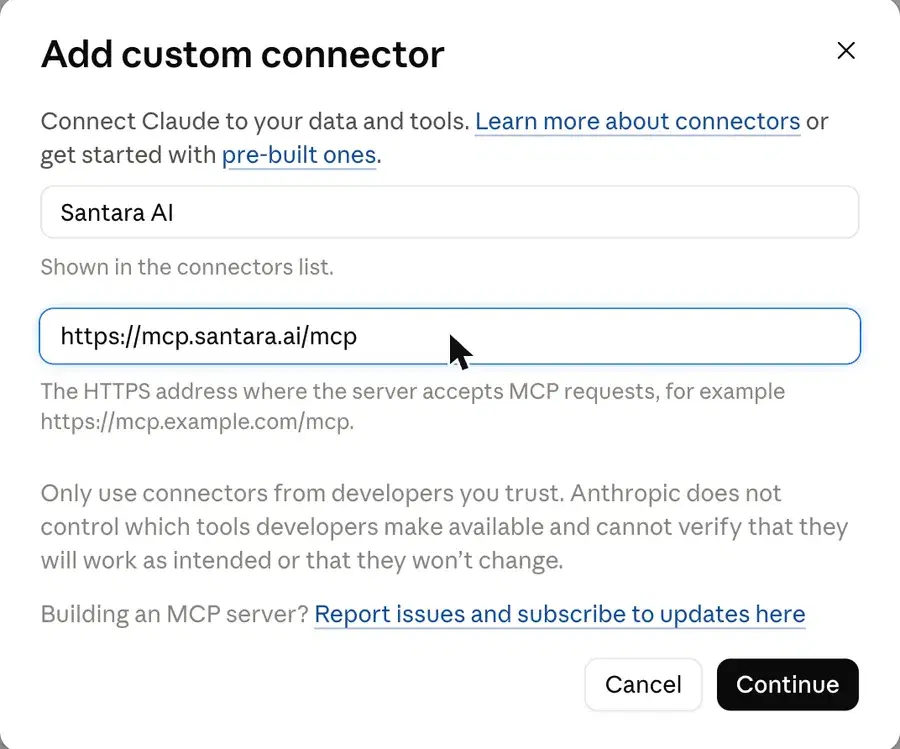
In Claude open Settings → Connectors → Add → Add custom connector.
Paste the address
Name it Santara AI, paste https://mcp.santara.ai/mcp and click Add, then Connect. Sign in, pick your workspace and click Allow.
Start asking
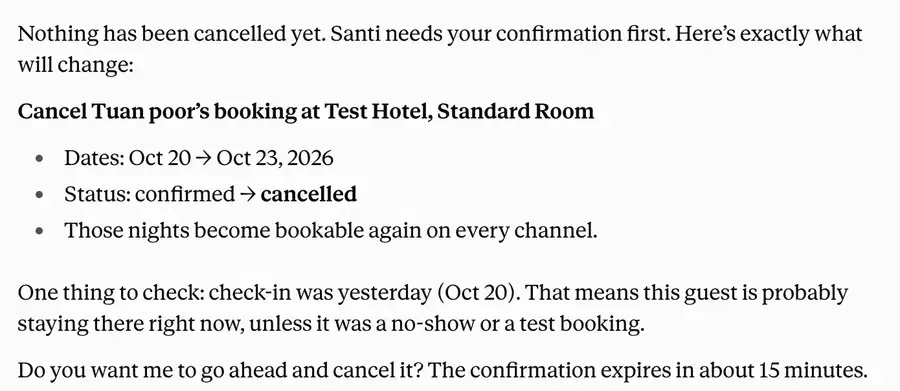
Switch Santara AI on under + → Connectors in a chat. Before anything that needs your yes, Claude shows the exact change.
claude.ai, Claude Desktop and the mobile app. Free Claude plans allow one custom connector. Full step-by-step guide ↗
Everything it can do
Generated from the live server’s catalog, so this list matches what your assistant gets.
FAQ
MCP, the Model Context Protocol, is the open standard AI assistants use to connect to other software. Santara AI runs an MCP server at https://mcp.santara.ai/mcp, so Claude, ChatGPT, Grok and other MCP apps can read and work in your Santara AI workspace.
Claude (claude.ai, Claude Desktop and the mobile app) as a custom connector, and ChatGPT as a custom MCP server — both can do work for you. Grok, Claude Code, Cursor, VS Code and other MCP apps connect read-only: they answer questions but cannot change anything.
Within your rules. By default calendar, prices, cleaning and tickets run at once; guest messages, review replies, upsell offers, bookings and expenses ask you first in the chat, showing the exact change. Billing, settings, team and channel connections are never available. An owner or admin can change each of these on the AI assistants page.
For ChatGPT, yes: custom MCP servers need a paid ChatGPT plan, and on Business and Enterprise an admin may need to allow them first. Free Claude plans allow one custom connector; on Team and Enterprise an owner may need to add it first.
Your password never goes to the AI app: Santara AI signs you in itself and hands the app a key for the one workspace you pick. The assistant sees only what your role can see, and text inside guest messages, reviews or listings is never treated as an instruction.
In Santara AI go to Settings → Channels → Apps and click Disconnect next to the assistant. Changes stop within seconds, and anything it could read stops within ten minutes.
Every tool, its parameters and what it does is generated from the server itself at mcp.santara.ai/docs, and machine-readable at mcp.santara.ai/tools.json.
Connect Claude, ChatGPT or Grok to your Santara AI workspace.