Stay extensions: sell the empty night after checkout to the guest who's there
Why the guest already in the room is your easiest booking, when to send a stay extension offer, how much to discount, and how to arrange it on the platform.
 Tai Pham
The easiest booking you will get this week is already asleep in one of your villas. The guest knows the place, the bags are unpacked, and the room is already made up for them. If tomorrow night is still empty, one short message can turn it into a paid night without a new check-in, a new key handover or a turnover clean.
Most hosts never ask. They watch the empty night sit on the calendar, maybe drop the price for strangers, and say goodbye to someone who might have happily stayed. This guide covers when to send a stay extension offer, how much to discount, how to word it, and how to arrange it properly on the booking platform.
Why the guest in the room is the easiest booking
A new booking for one night is expensive to run. You clean the room, change the linen, prepare a welcome, answer arrival questions and hand over keys, all for a single night. Many hosts set a minimum stay just to avoid that.
An extension skips almost all of it:
- No turnover clean. The room stays as it is. At most, a quick tidy and fresh towels.
- No new check-in. No arrival time to chase, no directions, no late-night key handover.
- No new guest risk. You already know how this guest treats the place.
- The night was empty anyway. A slightly lower price is still more than an empty bed.
It is one of the calendar gaps we covered in the upsells hiding in your calendar. Of the three, it is usually worth the most, because you are selling a whole night.
When the offer makes sense
Offer an extension only when all of these are true:
- The night right after checkout is free. Not booked, not blocked for maintenance or your own use.
- It is not likely to sell at full price. A free Saturday in high season, two weeks out, may still sell. A free Tuesday tomorrow probably won't.
- The guest has been easy. You are offering a favour. You don't owe it to everyone.
- The platform rules allow it. If the listing has a minimum stay longer than one night, check that a one-night change is accepted before you offer it.
When to send it: the day before checkout
Send it the day before checkout, ideally in the late morning or early afternoon. By then the night is unlikely to sell to someone new, and the guest still has time to change a flight, a bus ticket or their next hotel.
Earlier can work if you can see the night will stay empty, but don't send it on the morning of checkout. By then the guest has packed and booked their transport.
Always add a deadline: "let me know by 6pm". If a booking for that night comes in first, you are free to say it is gone.
How much to discount
Keep it small. Around 10% off the night is enough to feel like a thank-you without teaching guests to wait for deals.
| Live nightly rate | 10% off | Guest pays for the extra night |
| IDR 1,500,000 | IDR 150,000 | IDR 1,350,000 |
| IDR 2,800,000 | IDR 280,000 | IDR 2,520,000 |
| USD 120 | USD 12 | USD 108 |
Price from the live rate for that night, not your base rate. A Friday in July is worth more than a Tuesday in February, and the discount should follow.
Avoid big discounts like 30% or 40%. The guest would probably have stayed for 10% off, and a large cut makes your normal price look inflated.
One night or more?
Start with one night. It is the easiest yes: one more breakfast, one more sunset, one changed flight. It is also the safest for you, because one night rarely clashes with the next booking.
If the guest replies "could we stay two nights?", check the calendar and the cleaning plan, then answer with a clear price for both nights. Don't open with a long offer. A three-night extension is a new holiday, and the guest needs to plan it.
How to word it
Short and specific. Say which night, the exact price and how to say yes.
Hi Emma, the villa is free tomorrow night, so you're welcome to stay one more night if you'd like. It would be IDR 1,350,000, 10% under the usual rate. Just reply by 6pm today and I'll set it up through Airbnb.
If they say no, keep it warm:
No problem at all. Have a safe trip tomorrow, and thank you for looking after the villa.
How to extend a stay on Airbnb and other platforms
The extension must go through the same booking platform the guest booked on. That keeps the calendar correct on every channel, the payment protected, and you inside the platform's rules.
Step 1
Agree in the booking conversation
Make the offer and get the yes inside the guest's existing conversation on Airbnb, Booking.com or Expedia. Never suggest paying you directly or cancelling and rebooking.
Step 2
Change the reservation with the platform's own tools
On Airbnb, the guest can request a change to the trip, or you can send a change request with the new checkout date and price. On Booking.com and other platforms, use the change-dates option available for that reservation. If you are not sure, use the platform's own tools or help pages rather than a workaround.
Step 3
Check the calendar updated
Once the change is accepted, confirm the extra night shows as booked on every channel, so nobody else can book it.
Step 4
Tell the cleaner
Update the cleaning plan the same day (see below).
What to tell the cleaner
An extension moves a clean, it doesn't remove it. The cleaner needs to know before they turn up at 11:00 and find the guest still at breakfast.
- Cancel tomorrow's checkout clean for that room and move it to the new checkout day.
- Decide on a mid-stay touch: fresh towels and emptying bins, if that's your standard.
- Check the next arrival. If someone arrives on the new checkout day, the clean now has to fit that day's schedule.
- Tell them in one message: "Room 3: guest stays one more night. No clean tomorrow. Checkout clean moves to Friday at 11:00."
How Santara AI helps with stay extensions
Santara AI Upsells looks at your calendar, not your inbox. The day before a guest checks out, if the next night is free, it finds a stay extension offer: one extra night at a default 10% off the live nightly rate for that night. It never offers a night that is booked or blocked, and the offer expires on its own after checkout or if the booking is cancelled.
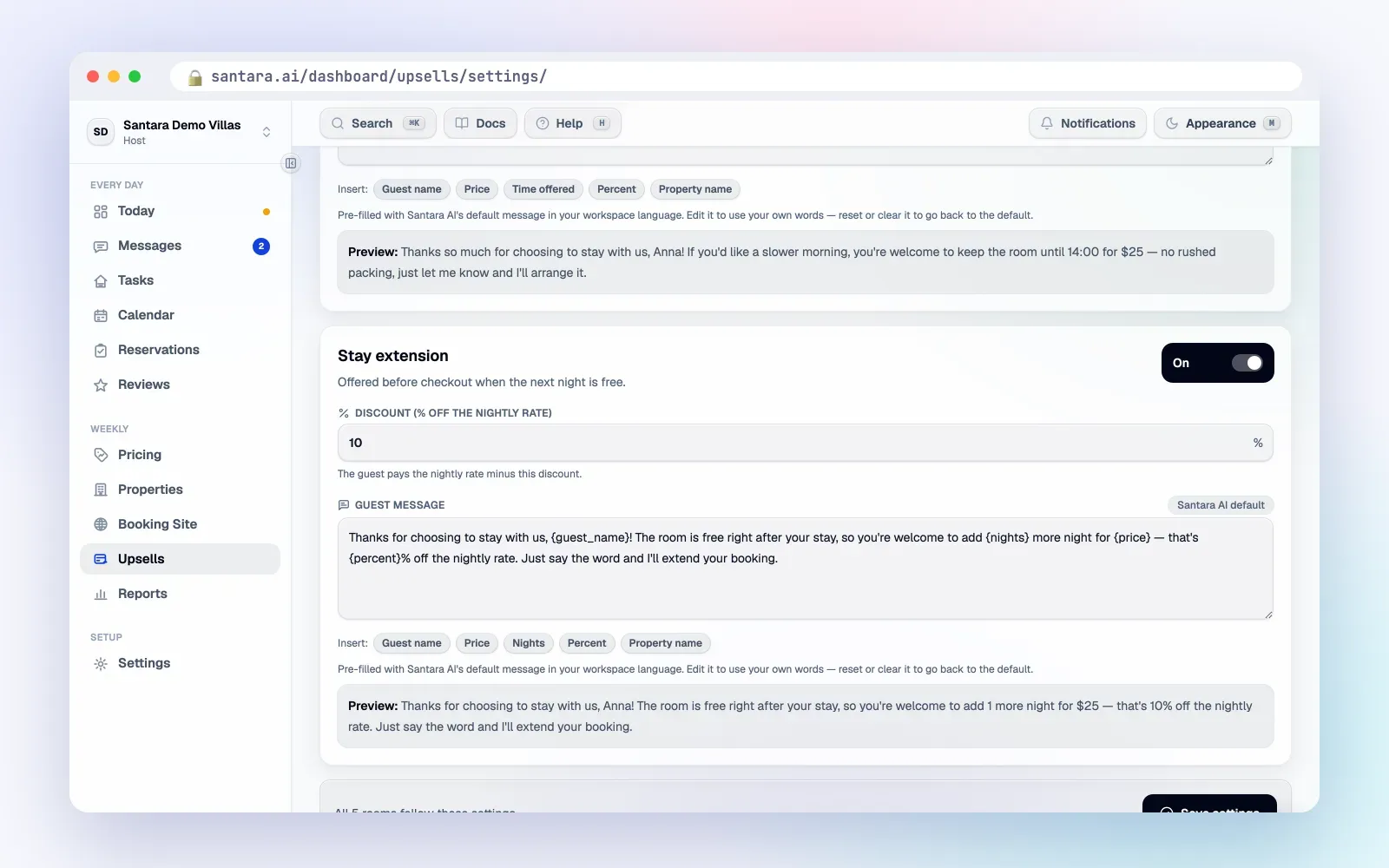
The offer shows in your Daily Brief email and on the Upsells page, with the guest, the dates, the price, why it was found and the exact message. You can change the discount and the message in Upsells → Settings, for the whole workspace or for a single room.
Nothing is sent automatically. You read it, then press send, and the message goes into the guest's existing conversation on Airbnb, Booking.com or Expedia, or WhatsApp if a conversation there is still inside WhatsApp's 24-hour reply window.
What Santara AI does not do
It does not extend the reservation or take payment. When the guest says yes, you arrange the change through the booking platform's own tools and update the cleaning plan. It offers one night only, and it does not yet track which offers were accepted.
FAQ
Is offering an extension inside the Airbnb chat allowed?
Yes, as long as the extra night is booked and paid through Airbnb. Don't ask the guest to pay you directly or to cancel and rebook.
What if someone books the night after I've sent the offer?
That's why the message has a deadline. If the night sells first, tell the guest kindly that it's no longer available.
Should I offer an extension to every guest?
No. Offer it when the night is free, unlikely to sell at full price, and the guest has been easy to host.
Does Santara AI change the checkout date for me?
No. It finds and prices the offer, and you send it. When the guest accepts, you change the reservation on the booking platform.
Keep reading
- Turnover day without chaos
- The guest message playbook: 10 moments that decide your review score
- A day running 12 villas in Canggu
Your first 3 months are free.
Join For Free