Occupancy, ADR and RevPAR explained for vacation rental hosts
The three numbers hotels live by, worked through for a few villas: formulas, an example month, the owner-stay and cleaning-fee mistakes, and reading by channel.
 Tai Pham
Occupancy, ADR and RevPAR are the three numbers every hotel manager watches, and they work just as well for a few villas or a small guesthouse. This guide gives you ADR, RevPAR and occupancy explained in plain terms: what each one measures, the exact formula, and how to calculate them from your own calendar in ten minutes a month.
The formulas are simple. The trouble is what you put into them. Count owner stays as bookings, or leave cleaning fees in your revenue, and the numbers start telling you a story that isn't true. Compare Airbnb's dashboard with your Booking.com extranet and you may find they don't even define "available" the same way.
So this post also covers the common mistakes, and how to read the three numbers when your bookings come from several channels. We use one hypothetical example all the way through. There are no market benchmarks here, because a benchmark is only useful when you know exactly how it was calculated.
The three numbers and their formulas
The hotel industry's standard definitions come from the CoStar (STR) glossary. Replace "room" with "unit" or "listing" and they fit short-term rentals well.
| Metric | What it tells you | Formula |
| Occupancy | How much of what you could sell, you sold | Nights sold ÷ nights available |
| ADR (average daily rate) | The average price of a night you sold | Room revenue ÷ nights sold |
| RevPAR (revenue per available room) | Revenue spread over every night you could sell | Room revenue ÷ nights available |
Two definitions sit under all three. Nights available is your number of units multiplied by the nights in the period: three villas over a 30-night month gives 90. Nights sold excludes complimentary nights, which CoStar explicitly leaves out of demand.
RevPAR also equals ADR × occupancy. That is why it is the most useful single number. A high ADR with empty nights and a full calendar at a low price can both produce a weak RevPAR, and only RevPAR shows you both at once.
A worked example
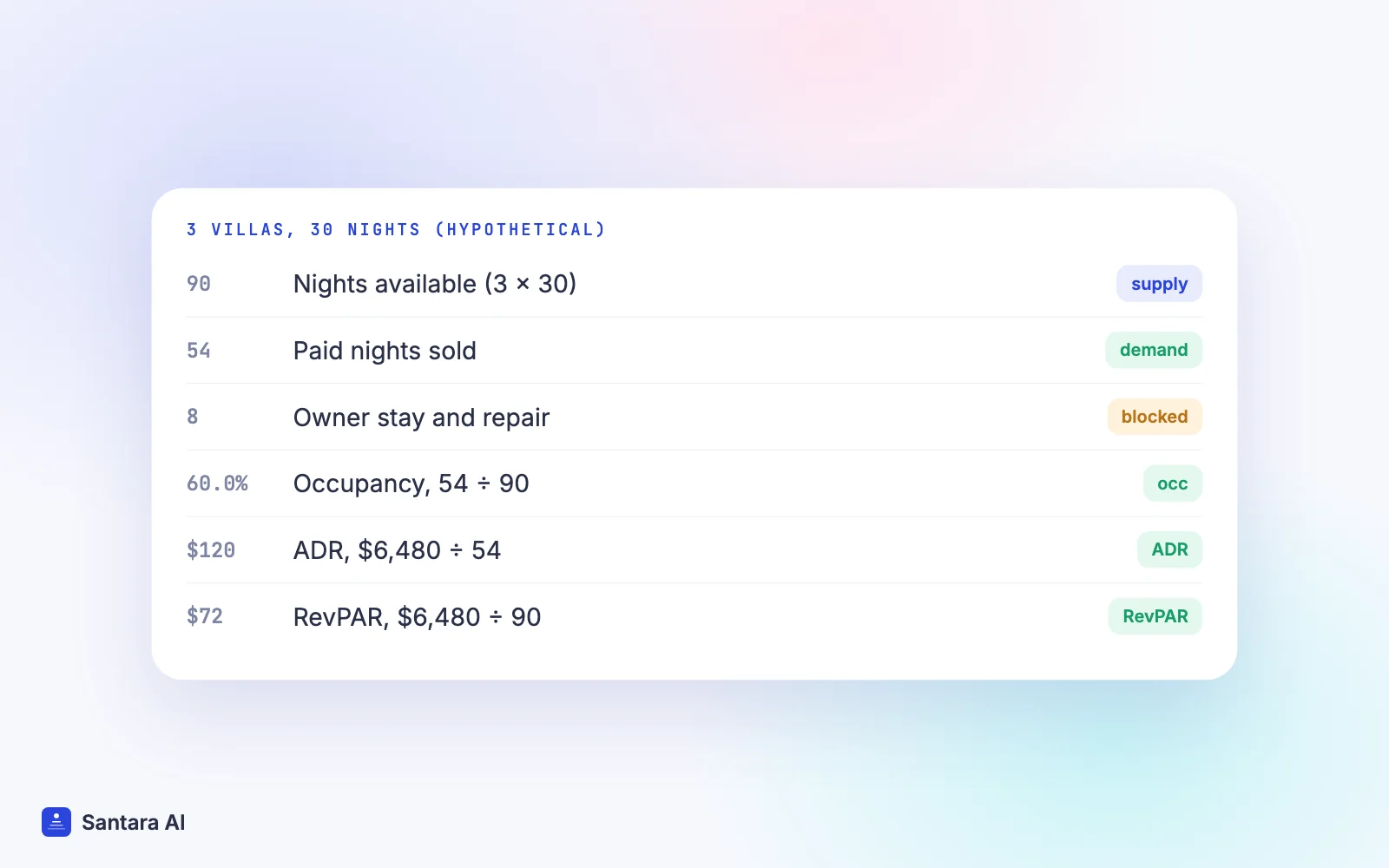
Say you run three one-bedroom villas in Canggu. Every number below is hypothetical.
In November (30 nights), you have 90 nights available. Guests stayed 54 paid nights. Room revenue, meaning nightly rates only, without cleaning fees or taxes, was $6,480. The owner of villa A stayed 5 nights, and villa C was closed for 3 nights to fix the pool pump.
| Calculation | Result |
| Occupancy = 54 ÷ 90 | 60.0% |
| ADR = $6,480 ÷ 54 | $120.00 |
| RevPAR = $6,480 ÷ 90 | $72.00 |
| Check: $120 × 60% | $72.00 |
That is the clean version. Now look at what happens with the blocked nights.
Common mistakes that skew the numbers
Counting owner stays as bookings. If you record the owner's 5 nights as booked at $0, nights sold becomes 59. Occupancy jumps to 65.6%, and ADR drops to $109.83. Both numbers are now wrong, in opposite directions. An owner stay is not a sale. Keep it out of nights sold.
Not deciding how to treat blocked nights. Owner stays and repair closures are nights you chose not to sell. You can report occupancy two ways, and both are valid if you label them:
- On all nights: 54 ÷ 90 = 60.0%. This shows what the property actually earned from its full capacity.
- On sellable nights only: 54 ÷ 82 = 65.9%. This shows how well you sold the nights you offered.
Airbnb's own definition in its occupancy and rates help article is nights booked divided by "total nights available to be booked", and the same page reports nights blocked separately. So if you compare your spreadsheet with Airbnb's figure, check which denominator you used. The mistake is mixing the two from month to month.
Putting cleaning fees into revenue. If you charged 15 stays a $40 cleaning fee, that is $600. Add it to room revenue and ADR rises to $131.11, even though no guest paid more for a night. Cleaning fees pay for cleaning. Track them separately. Airbnb says the same thing in its own way: it calculates average nightly rate from total nightly revenue divided by booked nights.
Mixing gross and net. The price a guest paid and the money you received after the platform's fee are different numbers. Pick one, write down which, and use it every month. Our Airbnb vs Booking.com fees guide shows how far apart they can be.
Ignoring unit counts. If one listing sells two identical rooms, it has two units of supply, not one. Count it as one and your occupancy can go over 100%.
Counting cancelled bookings. A cancelled stay with a charge brings in revenue but no occupied night. Keep that money out of room revenue, or ADR will look higher than any guest actually paid.
How to read the numbers across channels
Most hosts sell on two or three platforms plus direct bookings. Occupancy and RevPAR belong to the property, not to a channel, because the nights available are the same whichever site sells them. ADR, on the other hand, is very useful per channel.
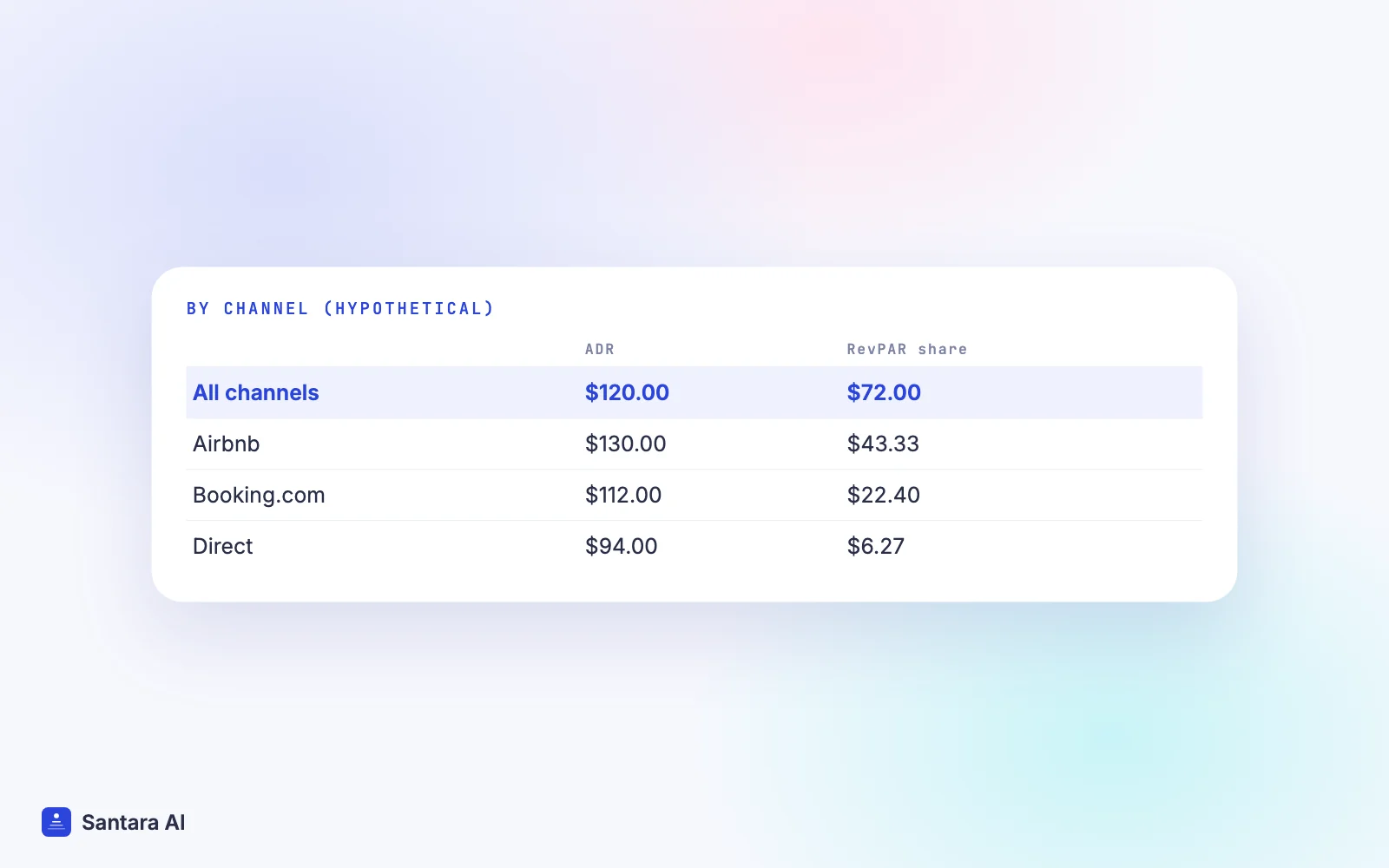
Continuing the example, here is how the 54 nights split:
| Channel | Nights sold | Room revenue | ADR | Share of RevPAR |
| Airbnb | 30 | $3,900 | $130.00 | $43.33 |
| Booking.com | 18 | $2,016 | $112.00 | $22.40 |
| Direct | 6 | $564 | $94.00 | $6.27 |
| Total | 54 | $6,480 | $120.00 | $72.00 |
"Share of RevPAR" is each channel's revenue divided by all 90 available nights. The shares add up to the property's RevPAR, which makes it easy to see where your money comes from.
A few things to keep in mind when you read a table like this:
- Each platform reports its own way. Airbnb's Insights shows occupancy and average nightly rate for your Airbnb listings only. Booking.com's performance guide describes ADR as the average rate you receive per room night, and its Analytics tab has a Pace report and Sales statistics. Neither sees the other channel's bookings, so neither shows your property's true occupancy.
- A higher ADR is not always a better channel. The channel with the highest ADR may also take the largest fee. Compare channels on what you actually received.
- Low direct ADR can be a choice. If you give direct guests a better price, a lower ADR there is expected. Watch whether direct nights grow.
A monthly routine
Step 1
Export every booking for the month
Pull check-in, check-out, nightly revenue and channel for all stays from every platform, or from one calendar if all channels feed it.
Step 2
Split nights by month
A stay from 29 November to 3 December has two nights in November and two in December. Count each night in the month it falls in.
Step 3
Mark blocked nights by reason
Owner stays, maintenance and personal use go in their own column. They are not sales.
Step 4
Calculate occupancy, ADR and RevPAR
Use nights available for the whole property. Write next to each number whether it is gross or net and which denominator you used.
Step 5
Compare with the same month last year
Seasons in Bali, Phuket or Da Nang swing hard. Comparing November with October tells you less than November with last November.
How Santara AI helps you measure occupancy, ADR and RevPAR
The hardest part of these metrics is collecting clean inputs from several places. Santara AI keeps one calendar per room as the source of truth. New bookings, changes and cancellations from every connected channel land on that same calendar, and your direct booking site sells from it too. That gives you one place to count nights sold and revenue across Airbnb, Booking.com, Agoda and the rest, instead of three dashboards with three definitions. You can see which channels connect on the integrations page.
Each room also has a unit count, the number of identical units you sell, and availability can never go above it. That is the same number you need for nights available. When you close dates for an owner stay or a repair, you use stop sell, and the dates close on every connected channel.
What Santara AI doesn't do here
Santara AI does not give you market benchmarks or compare your occupancy with other properties. It also does not decide for you whether owner stays count, or whether you report gross or net. Those choices are yours. Write them down once and keep them the same.
FAQ
How do you calculate RevPAR for a vacation rental?
Divide room revenue for the period by nights available, which is your number of units times the nights in the period. Three villas earning $6,480 in a 30-night month have a RevPAR of $6,480 ÷ 90 = $72.
What is the difference between ADR and RevPAR?
ADR is the average price of the nights you sold. RevPAR spreads the same revenue over every night you could have sold, so it falls when nights go empty. RevPAR equals ADR multiplied by occupancy.
Should owner stays count in occupancy?
Not as bookings. An owner stay is a blocked night, not a sale. You can report occupancy on all nights or on sellable nights only, but label which one you use and keep it consistent.
Does ADR include cleaning fees?
In the hotel definition, ADR uses room revenue only. Airbnb also calculates its average nightly rate from nightly revenue. Track cleaning fees separately so ADR reflects what guests paid per night.
Keep reading
- Sync prices and minimum stay across channels
- PMS vs channel manager for short-term rentals
- A direct booking website for vacation rentals
Your first 3 months are free.
Join For Free