Airbnb co-host guide: permissions, payouts and agreements
How to add an Airbnb co-host, pick the right permission level, split payouts, why the Co-Host Network isn't in Southeast Asia yet, and what to agree in writing.
 Tai Pham
You live in Ho Chi Minh City, your villa is in Phu Quoc, and your cousin on the island has offered to help. Or you own two apartments in Bali and want a local manager to handle guests while you keep the account. Either way, the cleanest setup on Airbnb is to add that person as an Airbnb co-host instead of sharing your password.
This guide covers Airbnb's official co-host features: how to add a co-host, the three permission levels, how co-host payouts are split, where the Co-Host Network is available (not yet in Southeast Asia, as of October 2026), what to agree in writing, and where tax and licence duties sit. It also shows how to give team access on Booking.com and Agoda, which have no co-host feature of the same name. Every platform fact links to the official page we read in October 2026; features change, so check your own account before you rely on them.
If you're still deciding whether you need a human helper at all, start with our comparison of an AI co-host and a human co-host. This post assumes you've decided and want to set it up properly.
What an Airbnb co-host is, officially
Airbnb's introduction to co-hosts describes a co-host as someone who helps you with your listing, such as a family member, neighbour, trusted friend or hired help. A few rules shape everything else:
- You can add up to 10 co-hosts to a home listing.
- The listing owner or a full-access co-host can add co-hosts to a home. A full-access co-host can only give new co-hosts limited access.
- New co-hosts must complete identity verification before accepting an invitation, and you must make sure they have agreed to receive invites by text or email, according to Airbnb's page on what co-hosts can do.
- You stay responsible. The same page says the listing owner is responsible for all co-hosts, including those added by a full-access co-host.
That last point matters. If a co-host cancels a booking or breaks a policy, it happens on your listing.
How to add an Airbnb co-host
Airbnb's help page gives the desktop path. The mobile apps follow the same logic.
Step 1
Open the listing
Go to Listings and select the listing you want to share.
Step 2
Find the co-host section
Under Listing editor, open Your space, then Co-hosts.
Step 3
Send the invitation
Choose Invite a co-host and enter their details. The invitee needs an Airbnb account and must complete identity verification before accepting.
Step 4
Pick the permission level
Select full access, calendar and messaging, or calendar only, then click Next. You can change permissions at any time, and Airbnb says changing permissions doesn't affect payouts.
Step 5
Set up payouts separately
If the co-host is paid through Airbnb, set that up under the co-host's Payouts, as explained below. Payouts can be set up for co-hosts with any permission level.
Airbnb co-host permissions compared
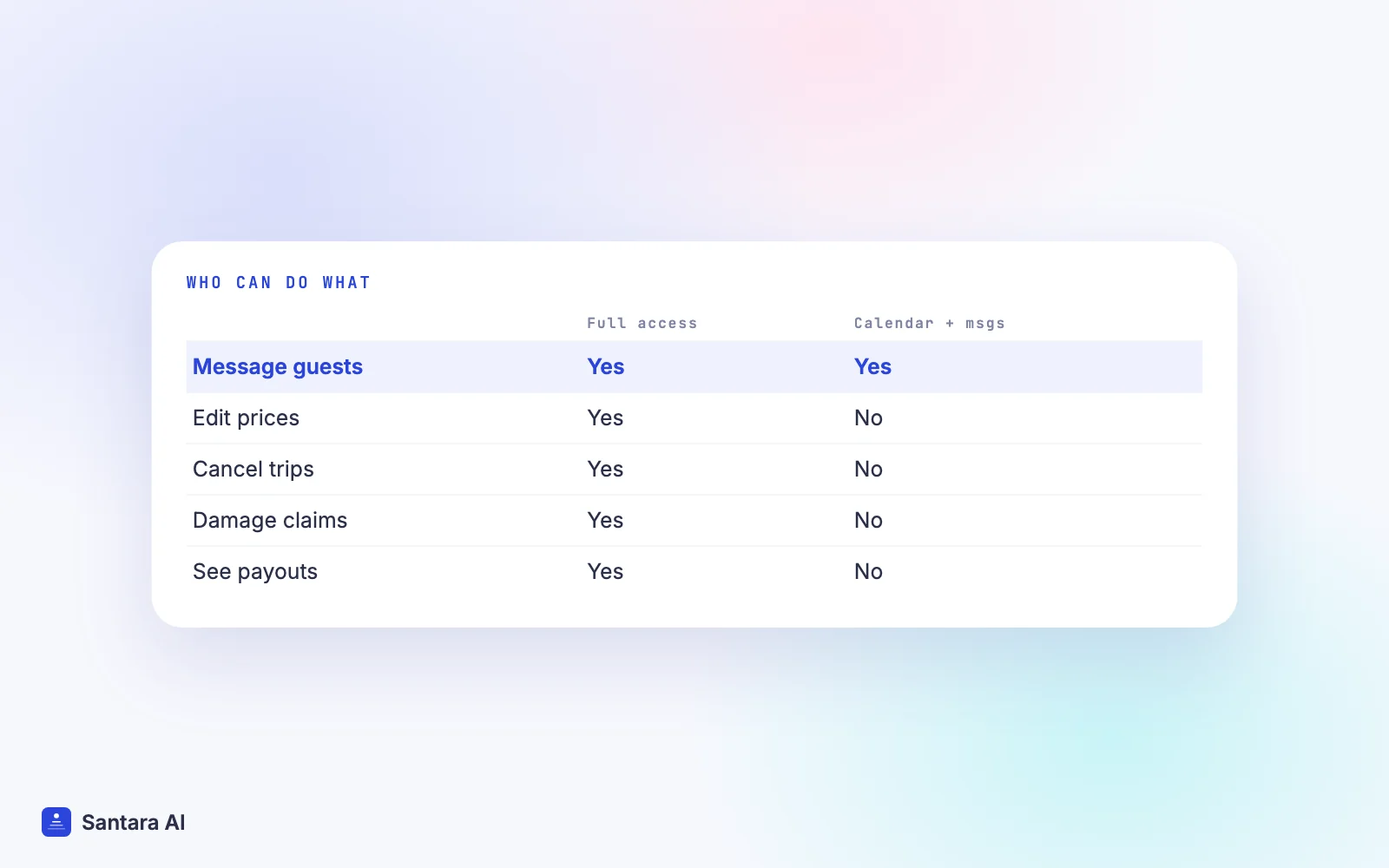
Airbnb has three permission levels. This table summarises the permissions table on Airbnb's what co-hosts can do page.
| Task | Full access | Calendar and messaging | Calendar only |
| View calendar, check-in and check-out | Yes | Yes | Yes |
| Message guests | Yes | Yes | No |
| Edit calendar, pricing and listing details | Yes | No | No |
| Accept or decline requests, change or cancel trips | Yes | No | No |
| Manage damage and Resolution Center requests | Yes | No | No |
| View their earnings dashboard and payouts | Yes | No | No |
| Add co-hosts (with limited access only) | Yes | No | No |
| Set the listing's primary host | Yes | No | No |
All co-hosts can message the host and each other. Co-hosts added before 3 May 2023 have full access by default, so if you added someone years ago, check what they can do today.
A practical rule: give full access only to someone you would trust to cancel a booking in your name. A cleaner who needs to see turnovers needs calendar only. A guest-relations helper needs calendar and messaging.
How Airbnb co-host payouts work
Airbnb's co-host payouts article sets the rules:
- Four options: the cleaning fee; the cleaning fee plus a percentage (excluding the cleaning fee); a percentage per booking, with or without the cleaning fee; or a fixed amount per booking.
- Only the listing owner can set up or edit co-host payouts. Co-hosts can't set them up for themselves or each other.
- The co-host has 14 days to confirm or decline. Changes only apply to bookings that start after the co-host confirms them.
- Timing. For most home reservations, host and co-host payouts are sent by the end of the business day after the guest's scheduled check-in.
- What's shared. Only guest stays on Airbnb. Experiences, services, host damage protection reimbursements and Resolution Center payouts are not shared.
- Order. With several co-hosts, cleaning-fee shares are paid first, then percentages, then fixed amounts, and the host receives what remains.
- Paperwork. Everyone needs at least one payout method and, where required, verified identity and taxpayer information.
- Location limits. Airbnb says some regional limitations may apply depending on where you, your co-host and the listing are located, so confirm the option appears for you before you promise it.
Here is a hypothetical example. The numbers are illustrative, and the percentages are whatever you and your co-host agree, not a benchmark. Say a three-night stay at a Bali villa gives you host potential earnings of USD 450 (USD 390 for the nights plus a USD 60 cleaning fee).
| Payout option (hypothetical) | Co-host receives | Host receives |
| Cleaning fee | USD 60 | USD 390 |
| Cleaning fee + 10% of the booking | USD 60 + 39 = USD 99 | USD 351 |
| 20% including cleaning fee | USD 90 | USD 360 |
| Fixed USD 50 per booking | USD 50 | USD 400 |
Payout splitting covers Airbnb bookings only. If your co-host also handles Booking.com, Agoda or direct guests, you pay them for those outside the platforms.
The Co-Host Network: not in Southeast Asia yet
Airbnb's Co-Host Network lets hosts find local co-hosts through Airbnb. As of October 2026, its help page lists Australia, France, Germany, Italy, Japan, Mexico, Puerto Rico, South Korea, Spain, the United Kingdom, Canada, the United States and Brazil. Vietnam, Indonesia, Thailand and Malaysia are not on the list. Co-hosts in the network need an account in good standing, verified identity, an average co-host rating of 4.8 or above, and any permits or licences required to provide their services.
For hosts in Southeast Asia, that means you find a co-host yourself, through referrals and local host groups, and then add them with the steps above.
What to put in writing
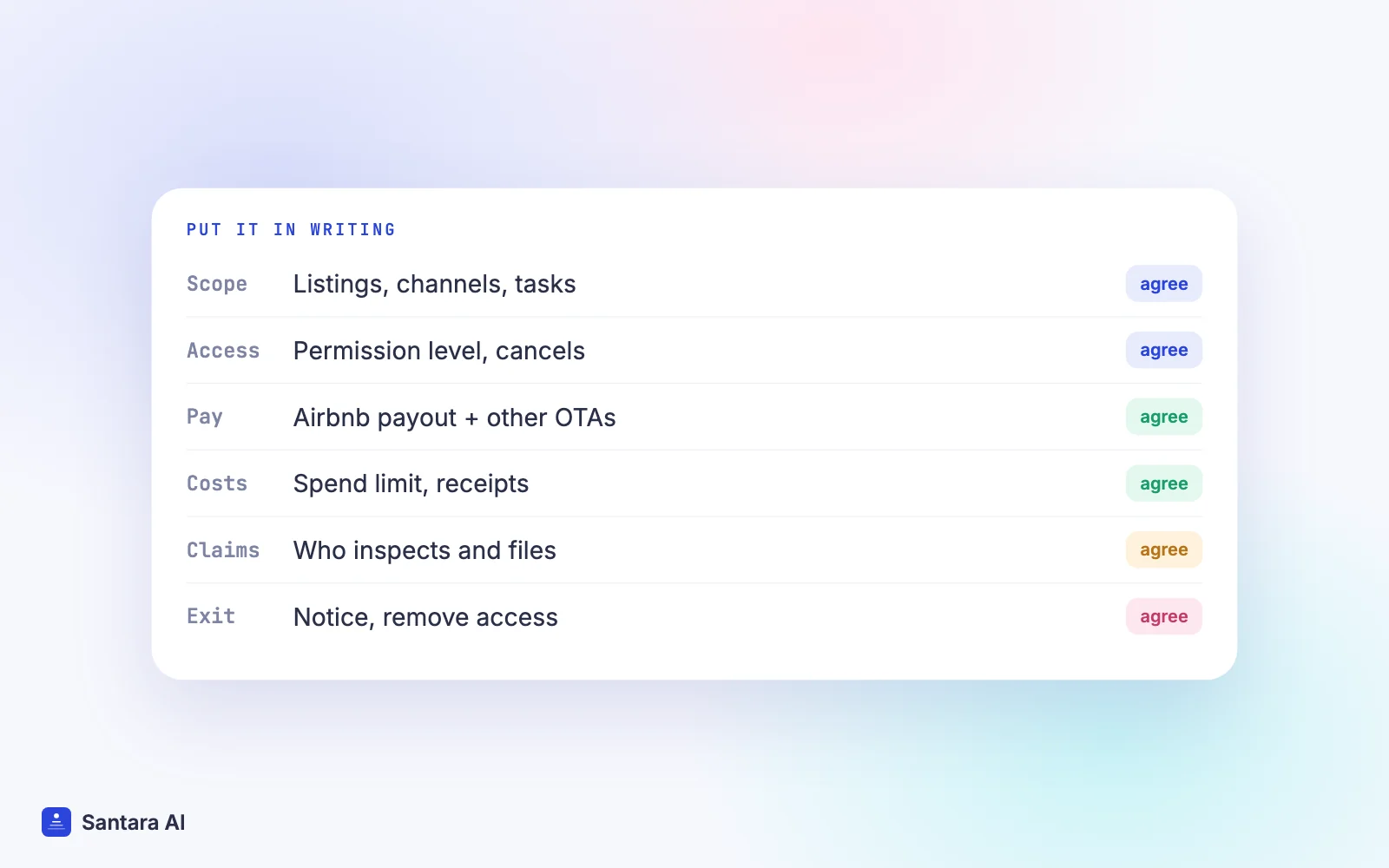
Airbnb's own page says hosts and co-hosts should agree how much reservation income goes to the co-host and how the co-host is reimbursed for expenses. Airbnb doesn't write that agreement for you. A one-page document covering these points prevents most disputes:
- Scope. Which listings, which channels (Airbnb only, or also Booking.com, Agoda, direct), and which tasks: messages, pricing, cleaning, maintenance, check-ins.
- Permissions. Which Airbnb permission level they get, and who may cancel bookings.
- Pay. The payout option and amount, how off-Airbnb bookings are paid, and when.
- Expenses. What they can buy without asking, the limit per item, and how receipts are reimbursed.
- Damage and claims. Who inspects after check-out and who files damage claims before the deadline.
- Guest data. That guest details stay in the platforms and are used only for the stay.
- Ending it. The notice period, removing access on the last day, and handing back keys and codes.
Tax and licence responsibilities
Adding a co-host doesn't move your legal duties. In Vietnam, the business that operates the homestay still needs the right registration; in Bali, the villa still needs its licences. See our Vietnam homestay licence guide and Bali villa licence guide. Guest registration with the police or immigration remains the operator's job too, whoever is on site.
A co-host paid through Airbnb receives income that may be taxable where they live, and Airbnb may ask each party for taxpayer information. We don't give tax advice: confirm with a local tax adviser or tax office how your and your co-host's income should be declared.
Team access on Booking.com and Agoda
Booking.com has no co-host payout feature that we found. Instead, its extranet has account types and access rights: primary accounts, admin accounts and user accounts. Admins and primary accounts create users under Create and manage users and choose their permissions, for example who can message guests or see financial information. There must always be at least one admin.
Agoda lets hotel-type and multi-unit properties add users in the Partner Portal under Settings, User management, with roles such as Admin, Content Only, Reservations Only and three Finance roles, according to its user management guide. Changes require two-factor authentication. Single-unit home owners can't add users there and must contact Agoda support.
How Santara AI fits a co-hosting team
Santara AI doesn't split payouts or pay co-hosts. What it gives a host and co-host is one shared place to work across channels:
- Team members with roles. A workspace can invite team members with roles, so your co-host works in Santara AI under their own login.
- One calendar. Bookings from Airbnb, Booking.com, Agoda and other connected channels land on the same calendar, so the co-host doesn't need every extranet open to see who arrives.
- One inbox. Messages from Airbnb, Booking.com and Expedia arrive in the Santara AI inbox. AI drafts replies, and nothing sends until someone presses Send.
- Cleaning without a group chat. New bookings create cleaning tasks automatically. The cleaning board shows jobs by day; cleaners can be added by name and assigned. The Daily Brief (6am by default) lists arrivals, departures and cleans, with a WhatsApp share button per property group.
- Monthly statements. Reports show one statement per property: gross booking revenue minus channel fees minus expenses. It doesn't calculate a co-host or management fee; agree that separately.
What Santara AI doesn't do
No payout splitting, no co-host contracts, no tax or licence filing. Agoda, Traveloka and Tiket.com guest messages don't come into the Santara AI inbox, and cleaners don't get an app or automatic messages.
FAQ
How do I add a co-host on Airbnb?
Go to Listings, select the listing, open Listing editor, then Your space, then Co-hosts, and choose Invite a co-host. Pick full access, calendar and messaging, or calendar only. The co-host must verify their identity before accepting.
How much does an Airbnb co-host get paid?
Airbnb doesn't set a rate. The listing owner chooses the cleaning fee, cleaning fee plus a percentage, a percentage or a fixed amount per booking, and the co-host has 14 days to confirm. The amount is a private agreement between you.
Is the Airbnb Co-Host Network available in Vietnam or Indonesia?
Not as of October 2026. Airbnb's help page lists 13 countries and territories, including Australia, Japan, South Korea, the UK, the US and Brazil, and no Southeast Asian country. Hosts here find co-hosts themselves.
Can a co-host cancel a booking?
Only a co-host with full access can accept, decline, change or cancel reservations. The listing owner remains responsible for all co-hosts, so give full access only to someone you trust with that decision.
Keep reading
- Owner statements and management fees
- Turnover checklist and cleaning schedule template
- Guest message playbook
Your first 3 months are free.
Join For Free