Airbnb listing suspended or deactivated: what to do next
Suspended, removed or just unlisted? What each Airbnb status means, the official reasons, what happens to bookings, and how to appeal.
 Tai Pham
The email arrives on a normal morning. Your listing is no longer showing in search, or it says your Airbnb listing is suspended, or your account is "pending removal". The first reaction is usually panic, then a search for tricks. Most of what you will find online is guesswork from forums. This guide sticks to what Airbnb itself publishes.
We read Airbnb's help articles on suspensions, restrictions and removals, the ground rules for home hosts, account closure, unlisting, pricing and payment transparency and the Terms of Service for users outside the EEA, UK and Australia (last updated 5 February 2026). All were checked on 27 October 2026. Airbnb changes these pages, so confirm anything important in your own Help Center.
The short version: first work out which status you actually have, because "suspended", "removed" and "unlisted" mean very different things. Then read the reason, protect the guests you already have, and appeal before the deadline with evidence, not arguments.
Airbnb listing suspended, removed or unlisted: which one is it?
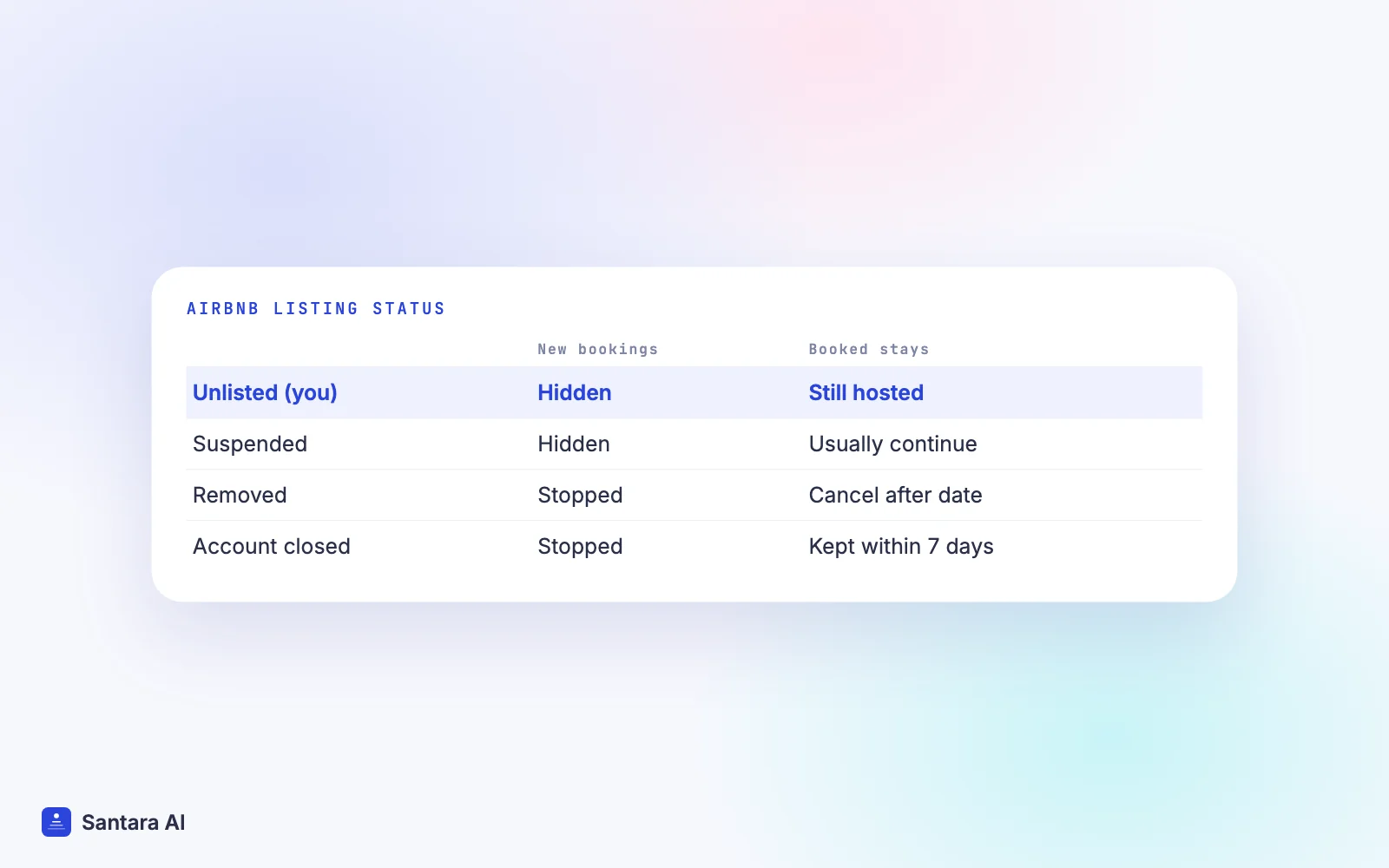
Hosts often use "deactivated" for everything. Airbnb uses more precise words, and each one has different effects on search, new bookings and existing reservations.
| Status | Who causes it | New bookings | Existing reservations | Way back |
| Unlisted | You | No (hidden from search) | Still hosted | Switch back to Listed |
| Pending (new host) | Identity check not finished | No | None yet | Finish verification |
| Listing suspended | Airbnb | No (hidden from search) | Usually continue | Reactivate after the period, may need proof of fix |
| Listing removed | Airbnb | No | Check-ins after the removal date are cancelled | Only through a successful appeal |
| Account restricted | Airbnb | Depends on the restriction | Continue | Follow the notice |
| Account removed | Airbnb | No, listings hidden | Check-ins after the removal date are cancelled | Appeal |
A few details from Airbnb's pages are worth knowing:
- Unlisted is your own choice. Airbnb's unlisting article says you can unlist for set dates (up to 6 months) or indefinitely, and you still host any confirmed reservations. Some hosts call this "snoozing".
- Pending applies to new hosts. Airbnb's identity verification article says your listing won't be published until verification is complete.
- Account restricted can mean, according to Airbnb, losing eligibility for Superhost, being blocked from publishing or co-hosting new listings, and being paid on a different schedule.
- Account closed is the far end. Airbnb says it generally closes a host account for repeatedly suspended listings, overall ratings below 99% of all other ratings on Airbnb, or Terms of Service violations.
If your listing is merely unlisted or pending, you do not need an appeal. Fix the setting or finish verification.
Why Airbnb suspends or removes listings: the official reasons
Airbnb does not publish a points system or a fixed number of strikes. What it does publish are the rules it enforces. The ground rules for home hosts cover four areas:
- Listing accuracy. The listing must describe the home truthfully: location and map pin, size, beds, privacy, noise, amenities. Photos must show the real space; Airbnb says content that uses AI or editing to hide damage or add amenities that don't exist must be removed.
- Reservations and cancellations. Don't cancel confirmed stays unless there is a valid reason beyond your control, and don't ask guests to cancel for you. Guests must be able to get in at check-in, with correct directions and working access codes.
- Communication. Airbnb sets response expectations: within 3 days for material questions when check-in is more than 5 days away, within 1 hour near check-in or during a time-sensitive issue (local daytime), and within 12 hours for other messages during the stay or within 5 days of arrival.
- Cleanliness and safety. No mould, pests or other health hazards, and a clean home between every stay.
Beyond the ground rules, several other official policies can lead to suspension or removal:
- Ratings. Airbnb says it may message hosts who receive low ratings, and repeated low ratings suggest a listing isn't meeting expectations.
- Host cancellations. The host cancellation policy says the listing or account may be suspended or removed for cancelling confirmed bookings without a valid reason. A double booking counts as host-responsible.
- Off-platform payments. Airbnb's pricing and payment transparency policy says payments for mandatory fees and for current, future or repeat bookings must stay on Airbnb. Offering a discount to book off-platform, extending a stay outside Airbnb or collecting mandatory fees separately are listed as prohibited, and enforcement can include suspending or removing listings or accounts.
- Local law. The Terms of Service (section 12.3) allow Airbnb to act when a member violates applicable laws, and section 12.4 covers orders from authorities. Airbnb's guides for Vietnam and Indonesia list the registrations hosts there are expected to hold.
Section 12.3 of the Terms also says Airbnb may act "with or without prior notice", and that for minor violations you will usually get notice and a chance to fix the issue.
What happens to your upcoming reservations
This is the first practical question, because real guests are involved. Airbnb's suspension and removal article answers it by status:
- Listing suspended: current and upcoming reservations usually continue. Host them normally.
- Listing removed: reservations with check-in after the communicated removal date are cancelled.
- Account pending removal: you are expected to keep hosting current reservations under the ground rules. Reservations with check-in after the removal date are cancelled.
- Account closed: Airbnb's account closure article says you can still host guests arriving within 7 days. For later stays, Airbnb finds guests other accommodation and cancels the bookings, and you won't be compensated for those.
So check the dates in the notice carefully. Write down every reservation before and after the removal date. Host the ones that stay, and do it well: a problem during a pending removal makes everything harder.
If Airbnb cancels stays, those nights are empty again. If you also sell on Booking.com, Agoda or a direct site, make sure those dates reopen there, and make sure nothing you sell elsewhere overlaps with stays you still have to honour on Airbnb.
How to appeal an Airbnb suspension, step by step
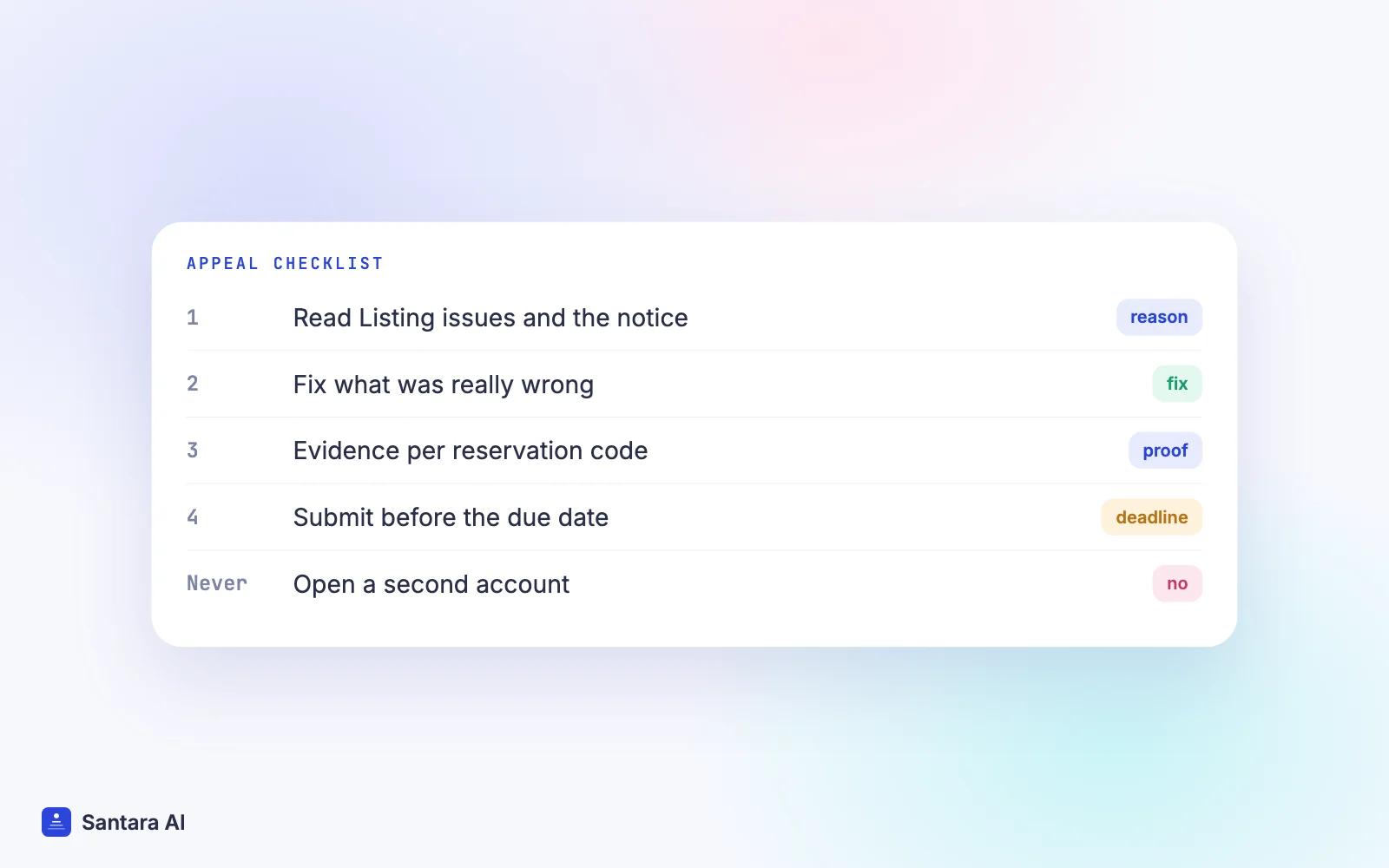
Airbnb's process is simple on paper: contact Airbnb directly or use the appeal link in your notice before the appeal due date. Airbnb does not publish a standard number of days, so the date in your own notice is the one that counts. Here is how to do it calmly.
Step 1
Find the exact reason
Go to Listing issues under Insights, and read the email or app notice in full. Note the policy named, the reservation codes mentioned and the appeal due date.
Step 2
Separate facts from feelings
Write one line per issue: what was reported, what really happened, and what proof you have. Leave out complaints about the guest or the platform.
Step 3
Fix what was real
If a photo was outdated, an amenity was missing or a door code failed, fix it first and keep proof: new photos, a repair receipt, an updated listing.
Step 4
Gather evidence by reservation code
Airbnb asks for the listing or account name, the reservation codes for the disputed stays, your reason for contesting each issue, and supporting documents. Keep all messages on Airbnb so they can be checked.
Step 5
Submit before the deadline and keep a record
Send the appeal through the link or by contacting Airbnb. Save the case reference and a copy of what you sent.
Airbnb says it considers new or corrected information, violations of its review policy, and other relevant circumstances. It is equally clear about what does not work. Disagreeing with a guest review is not enough, and arguing that it was a one-time incident is unlikely to help, because removals are based on repeated or severe violations. A review can only come down if it breaks Airbnb's reviews policy, for example a retaliatory or fake review. Our guide on replying to a bad review covers that part.
What not to do
- Don't open a new account. Section 12.5 of the Terms says that if your account has been suspended or limited, you may not register a new account or use another member's account.
- Don't move current guests off Airbnb. Asking them to cancel and rebook directly breaks the payment transparency policy and the ground rules.
- Don't cancel stays you can still host. Each host cancellation can bring fees and a blocked calendar under the cancellation policy. Our Airbnb cancellation policy guide for hosts explains them.
- Don't pay "recovery services". Airbnb's own process is the appeal link or customer support. Nobody outside Airbnb can reinstate a listing.
Prevention checklist
Most suspensions trace back to a few patterns: repeated low ratings, host cancellations, inaccurate listings, slow responses and off-platform deals. A short monthly check covers most of them.
- Compare your photos and amenity list with the real home. Remove anything that is gone.
- Read your last ten reviews for repeated words like "dirty", "noisy" or "not as described".
- Test the access instructions and door codes before each arrival.
- Answer every request within Airbnb's response times.
- Keep every payment, extension and extra fee inside Airbnb.
- Make sure each sales channel closes dates on all the others, so a double booking never forces you to cancel.
- Keep your local registration valid; see our Vietnam homestay licence guide or Bali villa licence guide.
- Screen guests and state house rules clearly; see our guest screening and party rules guide.
How Santara AI fits in
Santara AI does not monitor your Airbnb account, cannot see listing issues, and does not file appeals. What it can do is reduce how much your business depends on any one platform.
Santara AI replaces both the PMS and the channel manager. One calendar per room is the source of truth, and it feeds Airbnb, Booking.com, Agoda, Traveloka, Tiket.com, Expedia, Trip.com and other connected channels, 54 sales channels in total. A direct booking site sells from the same calendar. Reservations and cancellations from connected channels update the one calendar, and freed dates go back to the other channels. If Airbnb cancels future stays after a removal, those nights can be sold elsewhere instead of staying empty.
Because a booking on one channel lowers availability on all the others, double bookings become rare, and so do the host cancellations they cause. Airbnb and Booking.com guest messages arrive in one inbox where AI drafts a reply and nothing sends until you press Send, which helps you answer within Airbnb's response times.
What Santara AI does not do
It does not watch your Airbnb account health, read suspension notices, or appeal for you. Disconnecting a channel stops sync but never deletes your Airbnb listing or its reservations.
FAQ
Why was my Airbnb listing suspended?
Airbnb names the reason in your notice and under Listing issues in Insights. The usual causes in its policies are repeated low ratings, host cancellations, inaccurate listing details, slow communication, cleanliness or safety problems, off-platform payments and local law issues.
How long does an Airbnb suspension last?
Airbnb does not publish a standard length. It says reactivation is generally possible after the suspension period stated to you, and you may need to show the issue is fixed.
Can I appeal an Airbnb listing removal?
Yes. Use the appeal link or contact Airbnb before the appeal due date, with the reservation codes, your reasons for each issue and supporting documents. A removed listing can't be reactivated unless the appeal succeeds.
What happens to my bookings if my Airbnb account is deactivated?
If your account is closed, Airbnb says you can still host guests arriving within 7 days; later reservations are cancelled and guests are moved elsewhere. For listing or account removals, check-ins after the removal date are cancelled.
Keep reading
- How Airbnb search ranking works
- How to become an Airbnb Superhost
- Airbnb and Booking.com without double bookings
Your first 3 months are free.
Join For Free