Airbnb guest screening: party rules and what hosts may ask
How Airbnb guest screening works, the party rules, the settings you control and what you may ask guests under Airbnb's 2026 off-platform policy, plus Booking.com and Agoda.
 Tai Pham
A booking request arrives for your three-bedroom villa: two guests, one night, New Year's Eve, a brand-new account. Is it a quiet couple or a party? Airbnb guest screening is the set of checks that happen before and after that request lands, some done by Airbnb, some by you. Done well, it keeps parties out without turning you into the kind of host who judges people by their name or photo.
This guide sets out what Airbnb itself screens for, its party rules, the settings you control, what you may and may not ask a guest (including Airbnb's off-platform policy change for reservations booked from 20 November 2026), and how Booking.com and Agoda handle the same problems. Every platform fact links to the official page we read in October 2026. Policies change, so check the current version before you rely on any of it.
One rule runs through the whole post: screen the booking, not the person. Questions about the trip, the guest count and your house rules are fair. Decisions based on who someone is are not, and on Airbnb they break a written policy.
What Airbnb guest screening already does for you
Before you see a booking, Airbnb runs its own checks. The AirCover for Hosts page lists guest identity verification and reservation screening among the protections for hosts.
Airbnb's help article on how it screens for disruptive gathering risk says automated processes look for signals that a booking may carry a higher risk. The signals may include data about the reservation, the guest's account history, the listing itself and message thread topics. A flagged booking can end three ways: the reservation is rejected and the guest is pointed to other stays, the guest is asked to acknowledge Airbnb's policies on disruptive gatherings, or an Airbnb agent reviews it by hand.
What this means for you: some risky bookings never reach your inbox. It does not mean every booking that reaches you has been cleared. Airbnb does not promise the system catches everything, so your own settings still matter.
Airbnb's party rules in plain language
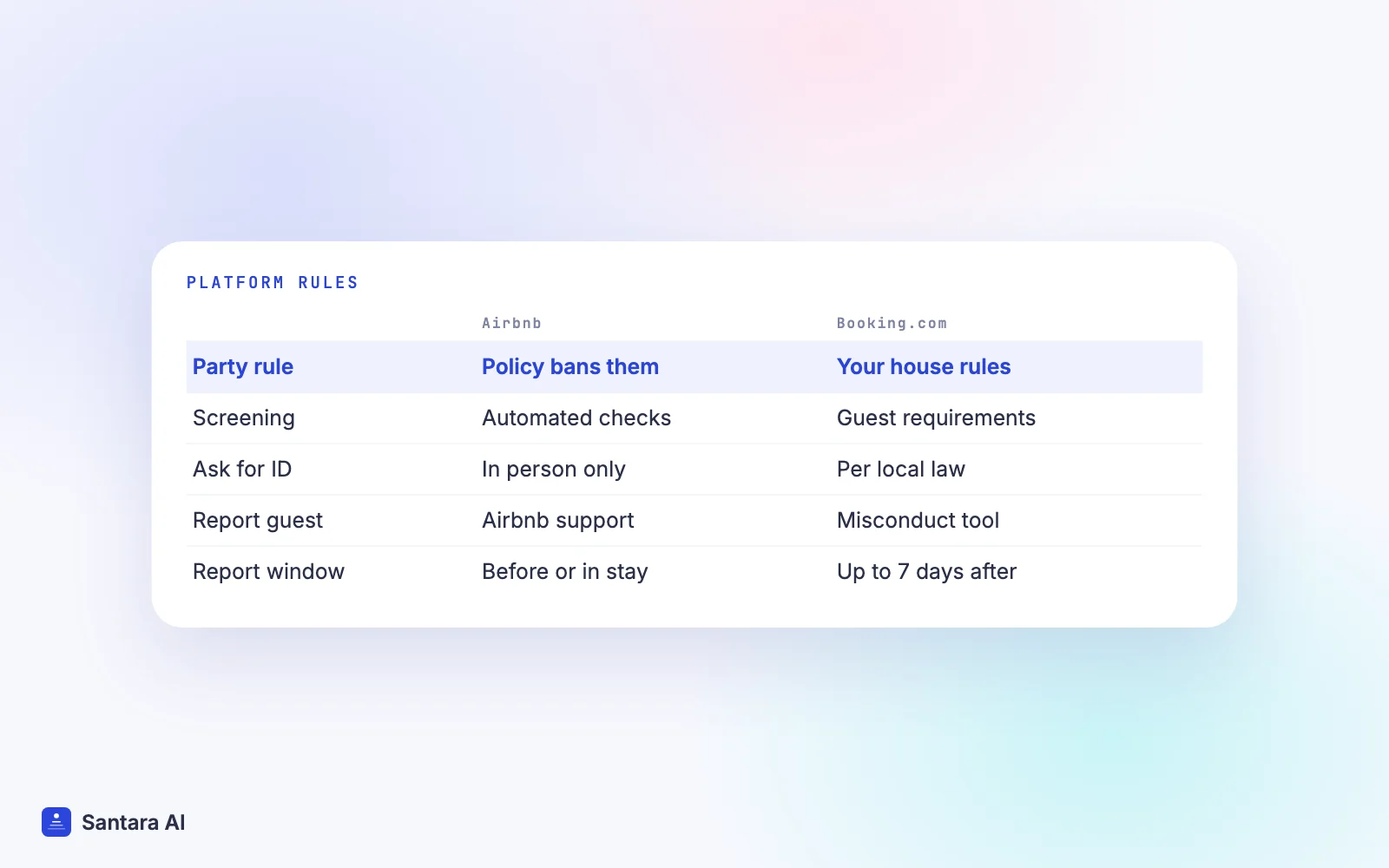
Airbnb's party rules sit in its Community Disturbance Policy. It does not allow:
- Disruptive gatherings and community disturbances of any size. Signs include excessive noise, excessive trash, trespassing, smoking and parking nuisances, vandalism in the neighbourhood, and reckless behaviour.
- Open-invite gatherings, such as parties advertised publicly or on social media.
- Advertising a listing as party friendly.
- Hosts facilitating severe or repeated disturbances.
Enforcement can range from education and warnings to suspending or removing listings and accounts. Neighbours can report a listing to Airbnb's Neighbourhood Support team. So the risk is yours too: a listing that keeps causing trouble can be removed, even if the guests were the ones partying.
The settings you control
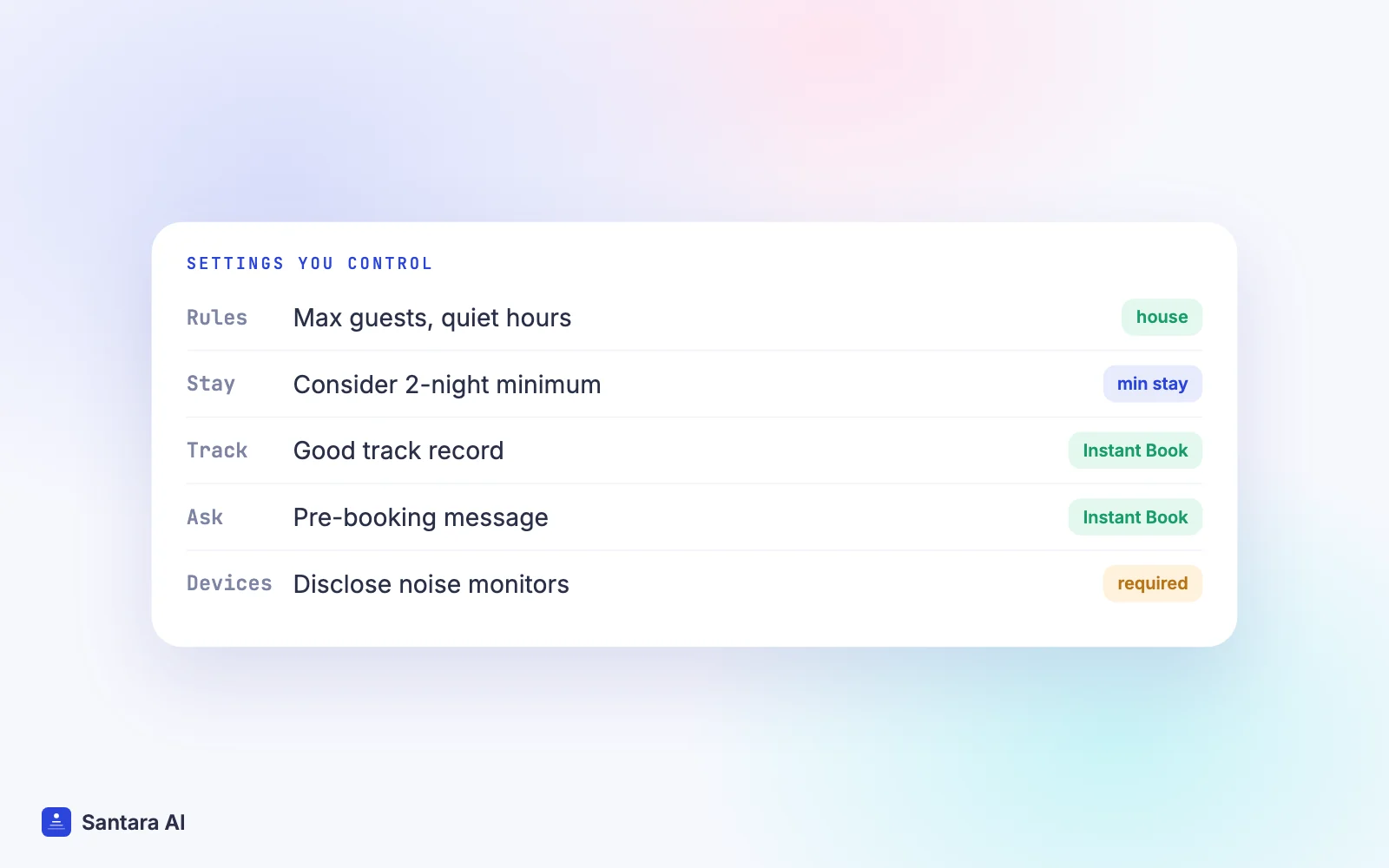
You can't run your own background checks on Airbnb, but you can shape who books and what they agree to. This is where most of your own Airbnb guest screening happens.
| Setting | Where | What it does |
| House rules | Listing editor | Maximum guests, quiet hours, a clear "No parties or events" line |
| Minimum stay | Availability settings | Airbnb's own tips suggest considering a 2-night minimum |
| Good track record | Instant Book guest requirements | Guests who completed a stay without incident or bad reviews |
| Pre-booking message | Instant Book guest requirements | Preset questions guests answer when booking |
| Noise monitor or exterior camera | Listing, guest safety section | Must be disclosed if you use one |
The guest requirements come from Airbnb's Instant Book settings: every guest must meet Airbnb's own booking requirements, and you can add a good track record requirement and a pre-booking message. Note that Instant Book must be on to add those requirements. The minimum-stay idea, the "No parties or events" wording and the disclosure rule for noise monitors and exterior cameras come from Airbnb's tips to help prevent disruptive parties.
Write house rules that are short and specific. "Maximum 6 guests at any time, including visitors. No parties or events. Quiet hours 22:00 to 07:00" is easier to enforce than a paragraph about respect. Our house manual template has wording you can adapt.
What you may and may not ask a guest
Two Airbnb policies decide this.
The Nondiscrimination Policy. Airbnb's Nondiscrimination Policy says you may not decline or cancel a booking, set different terms or rules, or state a preference for or against a type of guest because of a protected characteristic. The list includes race, religion, gender, age, disability, familial status, marital status, ethnicity, national origin, sexual orientation, gender identity, caste and pregnancy. On age, hosts may share factual information about features that make a home unsuitable, but may not decide that a listing is not suitable for children. There are narrow exceptions, for example a host who shares common spaces may limit a home to guests of the host's own gender, and you are not required to break local law.
The off-platform policy. Airbnb's off-platform policy changes for reservations booked on or after 20 November 2026. From then, hosts may not solicit personal data at any point during the booking or the stay. That covers contact details, ID documents, financial data, background or credit information, and biometric or health data. You may check a guest's ID in person at check-in if that requirement is disclosed in the listing's requests section, but you may not keep a digital or physical copy, except where an exception applies. Reservations booked before 20 November 2026 stay under the previous version of the policy.
In practice:
- Fine to ask everyone: the purpose of the trip, who is coming and how many, expected arrival time, whether they have read the house rules.
- Not fine: questions about nationality, religion, age or family plans used to decide whether to accept; a phone number, email or passport photo before booking; asking guests to register on another website to get in.
Ask the same questions of every guest. If you only question some guests, you are profiling, even if your intentions are good.
ID checks only where the law requires them
In Vietnam and Indonesia, the law, not the platform, may require you to record guest details. Vietnam requires stays to be reported to the police, and Indonesia requires foreign guests to be reported through APOA. Our guest registration guide explains both, as of October 2026.
Airbnb's off-platform policy allows collection where it is necessary to comply with applicable law, as long as you disclose what is required and why in the requests section before booking, collect no more than the law requires, and store and dispose of it securely. Airbnb may ask for evidence that the exception applies. So: if the law makes you register guests, say so in the listing, collect only what the form asks for, and don't keep passport copies "just in case".
When a booking worries you
Most worrying signals have an innocent explanation. A one-night booking on a holiday may be a family visiting relatives. Ask, don't assume. Good Airbnb guest screening at this stage is a routine you apply to everyone.
Step 1
Ask a neutral question
Reply in the platform's messages: "Thanks for booking. What brings you to town, and who will be staying?" Send the same message to every guest who books on a high-risk date, so it is a routine, not a judgement.
Step 2
Restate the house rules
Quote your guest limit and the "No parties or events" rule, and ask the guest to confirm. A clear written confirmation is useful evidence later.
Step 3
Collect evidence, not impressions
Messages asking how many people fit, about the sound system, or reviews from other hosts mentioning noise or gatherings are the kind of evidence Airbnb's tips describe. A guest's name, photo or country is not evidence.
Step 4
Contact Airbnb before you cancel
Airbnb's host cancellation article lists proof that a guest plans to hold an unauthorised party or break house rules as a valid reason to cancel without adverse consequences, and says you may need to submit documentation. If check-in is within 24 hours you can't cancel online and must contact Airbnb.
Step 5
Act early during a stay
If a party starts, message the guests on Airbnb, contact Airbnb support, and call local emergency services first if anyone is at risk. Photograph damage before cleaning; our damage deposit and AirCover guide covers the claim deadlines.
Booking.com and Agoda rules
Booking.com. Its page on protecting yourself and your property says guests must provide a valid email address and credit card details and maintain a good track record, and that you can set additional guest requirements in the extranet. It recommends house rules covering pets, smoking, parties and noise, and a damage deposit. Booking.com's Statement on Non-discrimination, Harassment and Abuse bars different terms or unequal treatment based on a long list of characteristics, while allowing reasonable minimum age limits that apply to all guests, appear in your property policies and are allowed by law. If something goes wrong, you can report guest misconduct from the reservation, from the day the guest arrives until seven days after check-out, and choose to block the guest from booking your property again.
Agoda. Agoda's guide to property directions, check-in info and house rules suggests rules such as "Events or parties are not allowed", quiet time after 11:00 PM and "Only registered guests are allowed". You add them in the Partner Portal under Property, Description, House rules, and guests see them under Policies. We found no official Agoda reservation-screening or party-detection programme for hosts, so your rules and your check-in routine do the work.
How Santara AI helps
Santara AI doesn't screen guests, verify IDs, register guests with the authorities or change your Airbnb house rules. Those stay with you and the platforms. What it does is keep the information you need in one place:
- One inbox for guest messages. Messages from Airbnb, Booking.com and Expedia arrive in the Santara AI inbox. AI can draft your routine "who's coming and why" question or a house-rules reminder, and nothing sends until you press Send.
- One calendar. Bookings from every connected channel land on the same calendar, so you can see which stays fall on high-risk dates such as New Year's Eve.
- The Daily Brief. The morning email (6am by default) lists the day's arrivals, departures and cleans, so you know which check-ins to watch.
- Door codes stay private. Wi-Fi passwords and door codes are stored per building and room for the host, are not shown on the public booking site, and message templates can insert them when you're ready to send.
What Santara AI doesn't do
It doesn't score guests, block bookings or run identity checks. Agoda, Traveloka and Tiket.com guest messages don't come into Santara AI. And nothing here is legal advice: confirm guest registration duties with your local police or immigration office.
FAQ
How does Airbnb screen guests for parties?
Airbnb says it uses automated processes that look at signals such as reservation details, the guest's account history, the listing and message topics. A flagged booking may be rejected, the guest may be asked to acknowledge Airbnb's rules, or an agent may review it.
Can I ask an Airbnb guest for their ID?
For reservations booked from 20 November 2026, you may check ID in person at check-in if the requirement is disclosed in your listing's requests section, but you may not keep a copy unless an exception applies, such as a legal requirement.
Can I cancel an Airbnb booking if I think the guest will throw a party?
Airbnb lists proof that a guest plans an unauthorised party as a valid reason to cancel without adverse consequences. Gather evidence, contact Airbnb first if unsure, and remember you can't cancel online within 24 hours of check-in.
Can I refuse guests who have no reviews?
Airbnb's Instant Book settings let you require a good track record. Declining for lack of reviews is a booking reason, not a protected characteristic, but apply the same standard to every guest and check the Nondiscrimination Policy first.
Keep reading
- Guest message playbook
- Self check-in guide: smart lock, keypad or lockbox
- How to reply to a bad review
Your first 3 months are free.
Join For Free