Double booking on Airbnb? What to do in the first hour
Two guests, one room. A minute-by-minute plan for the first hour of a double booking: who keeps the room, what each OTA expects, guest messages and root causes.
 Tai Pham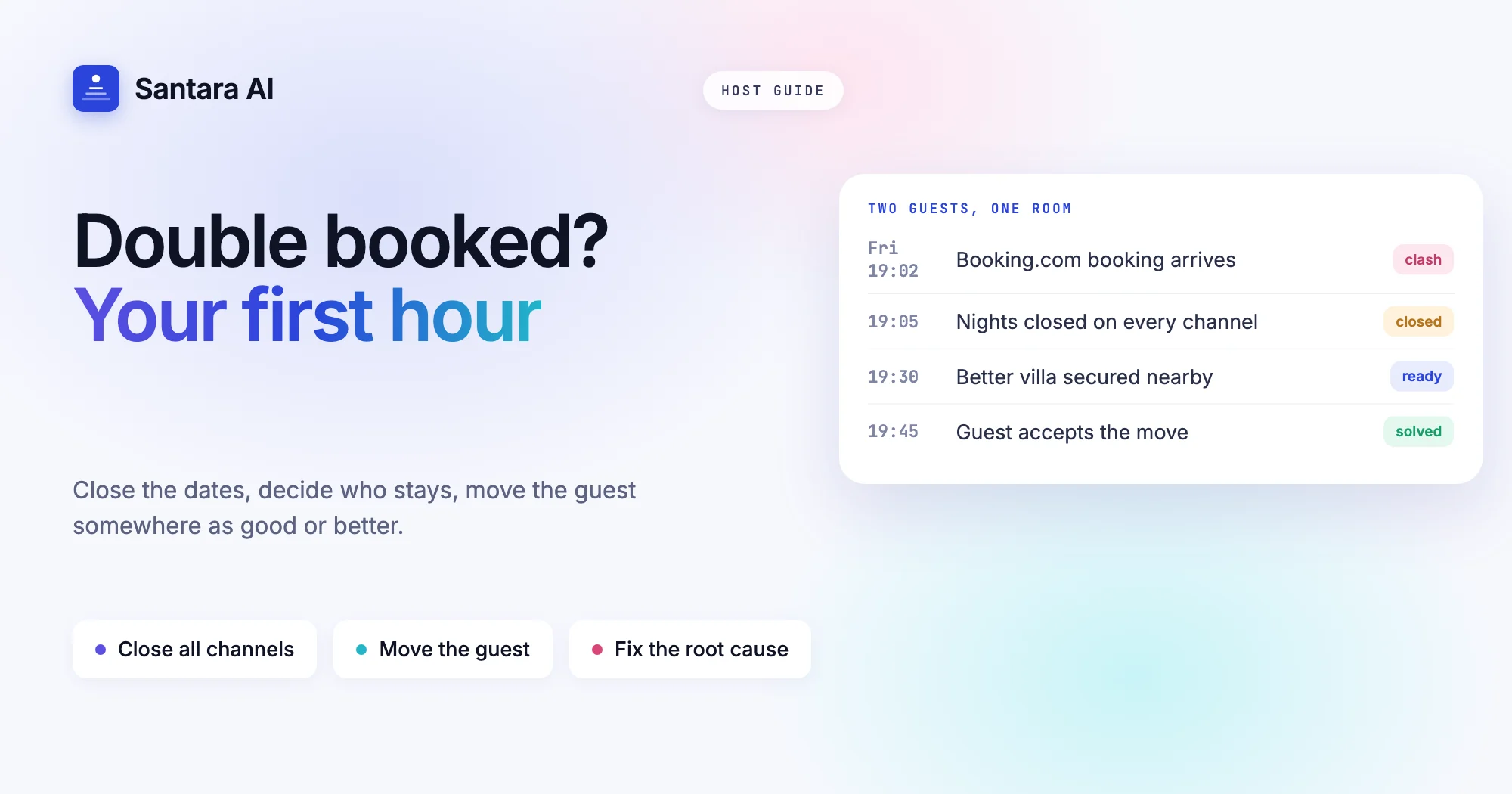
Your phone buzzes on a Friday evening. A new Booking.com reservation has just arrived for your Bali villa, and the same three nights were already sold on Airbnb last week. Two confirmed guests, one villa. If you are searching "double booking Airbnb what to do", you are probably in that moment right now, so this guide is written in the order you need it: the first ten minutes, the first hour, and the week after.
The good news is that a double booking is usually recoverable. Guests forgive a host who calls fast, explains plainly and offers a real alternative. What they do not forgive is silence until check-in day. The platforms also have clear rules about what you owe the guest you move, and those rules are worth knowing before you pick up the phone.
This post is about responding to a clash that has already happened. If you want to understand why Airbnb and Booking.com drift apart in the first place, read our guide to listing on Airbnb and Booking.com without double bookings after things calm down.
Double booking on Airbnb: what to do in the first ten minutes
Do not cancel anything yet. The first job is to stop the problem from growing and to collect facts.
- Close the dates everywhere. Block the clashing nights on every channel you sell on, plus your direct site. If a third guest books the same night while you are sorting out the first two, the problem doubles.
- Screenshot both reservations. Capture the booking reference, the time it was made, the guest name, the dates, the amount and the status on each platform.
- Check if it is really two bookings. Sometimes one "booking" is an old iCal block that never cleared, a cancelled reservation still showing in a tool, or a modification of the same guest's stay. Open each platform's own extranet or host app, not only your calendar tool, and look at the reservation there.
- Note the arrival date. A clash tonight and a clash in March are different problems. The closer the arrival, the faster you need to move.
Work out which booking came first
Once you know both bookings are real and confirmed, decide which guest stays. The default rule most hosts use is simple: the booking that was confirmed first keeps the room. It is the fairest rule and the easiest one to explain.
Look at these details on both extranets before you decide:
| Check | Where to find it | Why it matters |
| Time the booking was confirmed | Reservation details on each platform | The earlier booking normally keeps the room |
| Booking status | Confirmed, pending, request | A request you have not accepted is not a clash yet |
| Arrival date | Reservation details | Decides how fast you must act |
| Length of stay and guest count | Reservation details | A short stay for two is easier to relocate than a week for six |
| Payment already taken | Payout or payment section | Affects refunds and who handles the money |
Sometimes the fair answer and the practical answer differ. If the second guest is a couple staying one night and the first is a family of six for a week, moving the couple may be kinder to everyone. That is your call. Just make it once and stick to it.
What each platform expects from you
Each OTA has its own rules for a host who cannot honour a booking. These are the points their own help pages state today. Policies change, so open the linked page before you act.
| Platform | What their help pages say |
| Airbnb | If you cancel before check-in, the guest is entitled to a full refund and Airbnb will help them find a similar place (rebooking and refund policy). You pay a cancellation fee (minimum $50 USD): 50% of the reservation amount for the nights not stayed if you cancel 48 hours or less before check-in, 25% between 48 hours and 30 days, 10% if more than 30 days out. Also, the dates can be blocked on your calendar, and Superhost status can be affected (host cancellation policy). |
| Booking.com | Move the guest to a room of the same or better standard if you can. If not, it is your responsibility to find accommodation elsewhere of the same or better standard and cover the costs, and arranging transport is advised. Contact Booking.com so the reservation is marked as a double booking (handling overbookings). |
| Agoda | Offer an equal or upgraded room at no extra cost. If you have none, find an alternative of equal or higher standard and provide transport at no extra cost to the guest. Contact Agoda as soon as possible; booking rejections carry costs under its terms (Agoda Partner Hub). |
Three points are easy to miss:
- Booking.com has deadlines. Its <a href="https://admin.booking.com/hotelreg/terms-and-conditions.html?cc1=01&lang=en">General Delivery Terms give you 30 minutes to offer an alternative once Booking.com asks you, if the stay starts within 24 hours. The window is 2 hours for stays between 24 hours and 7 days out, and 24 hours for stays further away.
- Airbnb does not want the guest to cancel for you. Its page on cancelling as a host says not to ask or encourage the guest to cancel on your behalf. Within 24 hours of check-in you need to contact Airbnb rather than cancel yourself.
- A double booking is not on Airbnb's list of valid reasons. The list of reasons to cancel without consequences covers things like major damage, serious illness and disruptive events. A calendar clash is not one of them, so expect the normal consequences.
Find the guest somewhere as good or better
Whatever the platform, the standard is the same: a comparable or better place, with the move costing the guest nothing. In practice you have three options, in this order.
Another unit of your own. If you run several villas, offer one of the same size or bigger. An upgrade with a private pool turns an apology into a story the guest tells their friends.
A trusted neighbour. Hosts who rarely have problems keep a short list of two or three nearby properties of similar standard, with the owners' WhatsApp numbers. Agree in advance that you will help each other in an emergency. Ten minutes on the phone beats an hour of searching listings.
A comparable place you book and pay for. If neither works, book a similar or better property nearby and pay the difference. Arrange the airport pickup or a car to the new address. Booking.com and Agoda both expect transport to be covered.
Before you message the guest, have the alternative confirmed: the address, photos, the date it is held until, and what you will pay. "We are looking for options" makes a guest anxious. "We have a better villa ready for you" does not.
Message the guest: two templates
Contact the guest you are moving through the platform's message thread, so there is a record. Then call if you have a number. Keep it short, take the blame, and lead with the solution.
When you have an alternative:
Hi Anna, I'm very sorry. Because of a calendar error on my side, your villa was booked twice for 12 to 15 December. I don't want this to affect your trip, so I've reserved a larger villa with a private pool 400 metres away, at no extra cost to you. Here are the photos and address. I'll arrange your airport pickup too. Can I confirm this for you?
When you have no alternative and must cancel:
Hi Anna, I'm very sorry to tell you that, because of a calendar error on my side, I can't host you on 12 to 15 December. I'm cancelling now so your full refund starts straight away and you have time to rebook. I've also found two similar villas nearby that are free on your dates (links below). Again, I apologise for the trouble.
Do not blame the platform or the other guest. Do not ask the guest to cancel. For more tone guidance, see our guest message playbook.
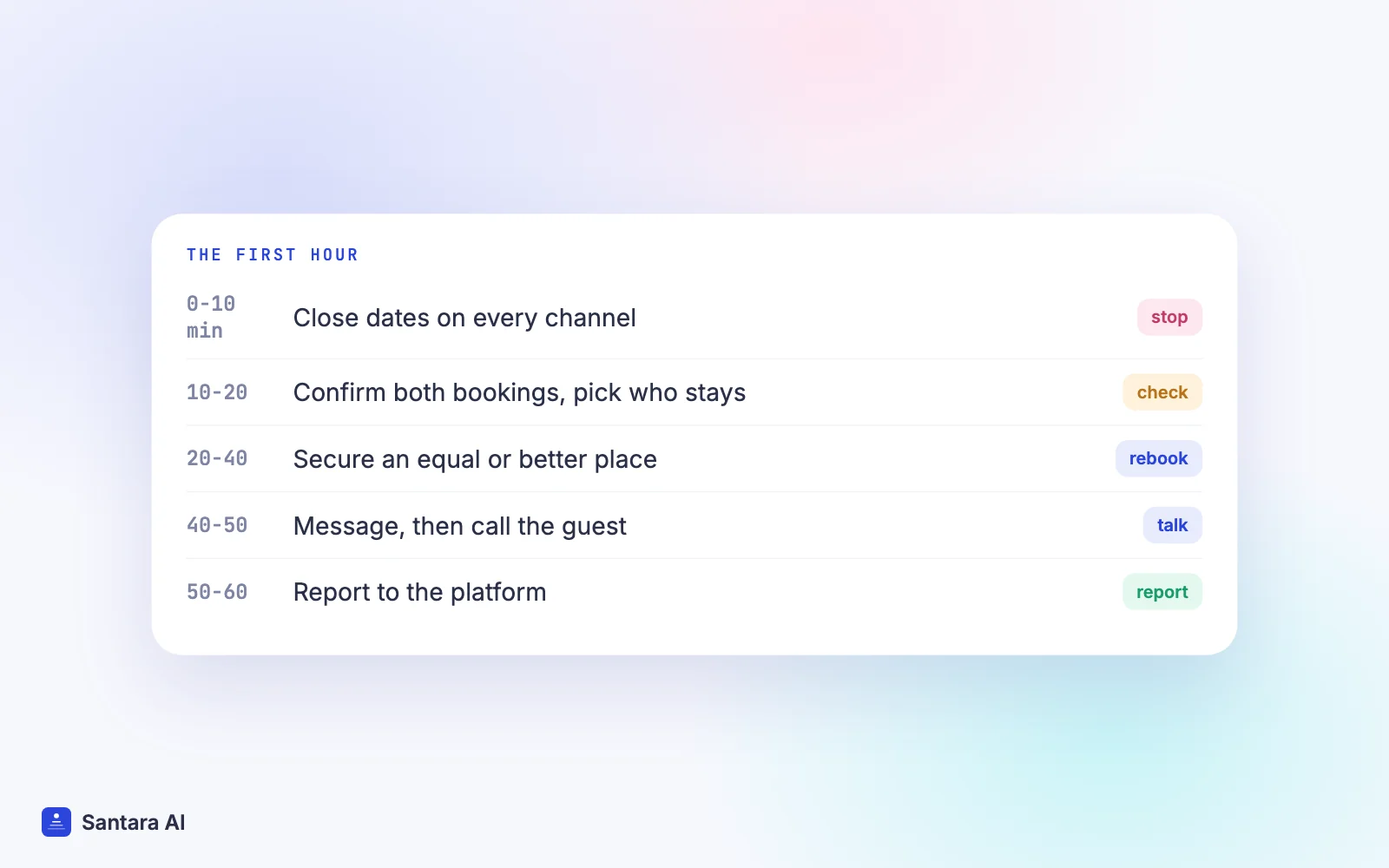
Your first hour, step by step
Step 1
Minutes 0 to 10: close and capture
Block the clashing nights on every channel and your direct site. Screenshot both reservations on the platforms themselves.
Step 2
Minutes 10 to 20: confirm and decide
Check both extranets to confirm both bookings are real. Decide who stays, normally the guest who booked first.
Step 3
Minutes 20 to 40: secure the alternative
Try your own units, then your neighbour list, then a comparable paid booking. Confirm it before you message anyone.
Step 4
Minutes 40 to 50: talk to the guest
Send the message on the platform, then call. Offer the alternative and transport, not just an apology.
Step 5
Minutes 50 to 60: tell the platform
Contact Booking.com or Agoda support to report the double booking and the relocation details. On Airbnb, cancel through the proper flow or contact Airbnb if check-in is within 24 hours.
Keep every receipt for the alternative stay and transport. You may need them if the platform asks what happened.
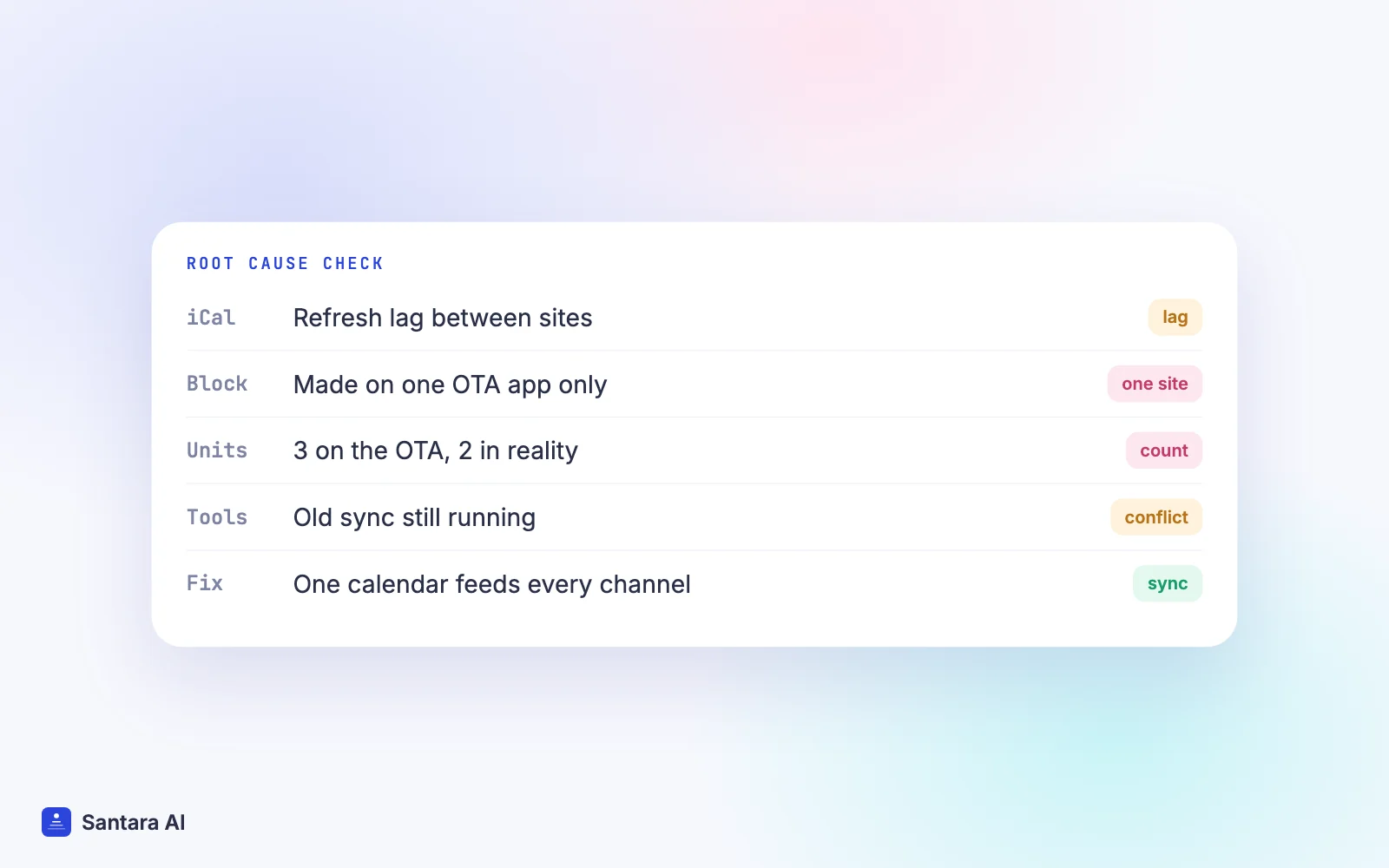
Find the root cause the next day
A double booking almost always has a mechanical cause. Find it, or it will happen again on a busier night.
| Likely cause | How to check | Fix |
| iCal lag | The second booking arrived soon after the first, on a site linked only by iCal | Booking.com itself says calendar sync updates can take up to two hours to refresh (source); use a direct connection for busy dates |
| A manual block that only lived on one site | You blocked the dates in one OTA's app, not in your main calendar | Make every block in one calendar that feeds all channels |
| Wrong unit count | A room type shows 3 units on Booking.com but you own 2 | Set the unit count to the real number of identical units |
| Two tools editing the same channel | An old channel manager or iCal link is still active next to a new one | Disconnect the old tool and remove old iCal imports |
| A change that never travelled | A guest extended or a cancellation was reinstated on one side | Check modifications as well as new bookings |
If you are still on iCal links, our comparison of iCal vs a channel manager explains where the gap comes from and when it is worth switching.
How Santara AI helps when a clash happens
Santara AI replaces both the PMS and the channel manager. Each room has one calendar, and every connected channel is fed from it. That removes most of the causes in the table above, and it makes the rare clash easier to handle.
- Both bookings land on one calendar. New bookings, modifications and cancellations from every connected channel arrive in the same place, so you see the clash next to everything else that week instead of in two separate apps.
- One block closes every channel. When you close the nights in Santara AI, the change pushes to Airbnb, Booking.com, Agoda and the rest, along with your direct booking site.
- Unit counts are enforced. Availability is capped at the room's unit count, so a 1-unit villa is never offered as 2.
- Rejected updates are visible. Sync runs through a queue with retries, and if a channel rejects an update it is recorded, not silently dropped. That gives you a place to start when you look for the root cause.
- Guest messages in one inbox. Messages from Airbnb, Booking.com and Expedia arrive in the Santara AI inbox, where AI drafts a reply. Nothing is sent until you press Send, so you stay in control of the apology.
You can see every supported channel on the integrations page.
What we don't do
Santara AI makes double bookings rare, not impossible. Two guests can still book the same night on two channels inside the short window before an update reaches the other side. It does not find or book alternative accommodation for you, and it does not cancel reservations on the OTA for you. Those steps stay with you and the platform.
FAQ
What should I do if I get a double booking on Airbnb?
Block the dates on every channel, confirm both bookings are real on each platform, keep the guest who booked first, find the other guest a comparable or better place, message them with the solution, then cancel or report through the platform's proper process.
Who pays when a guest has to be relocated?
On Booking.com and Agoda, their partner pages say the property finds the alternative and covers the costs, including transport. On Airbnb, the guest gets a full refund when you cancel, and you face host cancellation fees.
Can I ask the guest to cancel the double booking?
On Airbnb, no. Its help page says not to ask or encourage guests to cancel on your behalf. Cancel through the host flow yourself, or contact Airbnb if check-in is within 24 hours.
How do I stop double bookings from happening again?
Make one calendar the source of truth for every channel, set the correct unit count, make all blocks in that calendar, and remove old iCal links once a direct connection is live.
Keep reading
- What a channel manager is and how calendar sync works
- Booking.com channel manager
- Turnover day without chaos
Your first 3 months are free.
Join For Free