iCal sync delay on Airbnb: why your calendar is hours late
Airbnb imports iCal every 3 hours, Booking.com every two, Agoda several times a day. Why sync buttons don't fix the other side, and how to shrink the gap.
 Tai Pham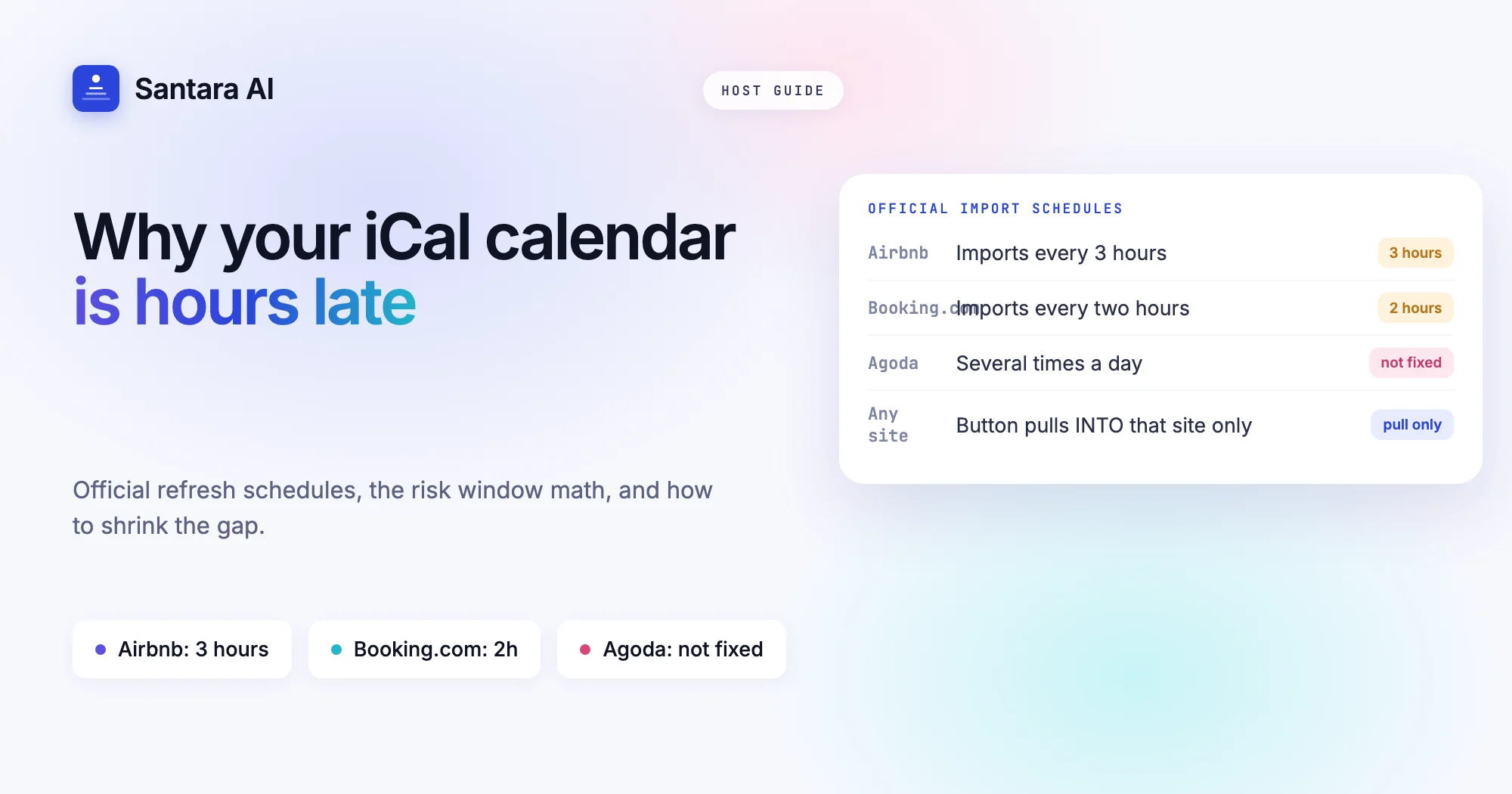
A guest books your villa on Booking.com at 10:05. You get the email, you relax, and you assume Airbnb now shows those nights as taken. It does not. Not yet. Until Airbnb next reads your Booking.com calendar link, the same nights are still open to anyone searching Airbnb. That gap is the whole story of iCal sync delay on Airbnb and every other site that imports calendar links.
Most hosts know iCal is "a bit slow". Few know how slow each platform says it is, who decides the timing, or why pressing a sync button on one site often does nothing for the other. This guide uses the platforms' own help pages, checked on 16 October 2026, to answer those questions with real numbers where they exist.
If you are still deciding between calendar links and a direct connection, read iCal vs channel manager first. This post assumes you already use iCal and want to understand, and shrink, the delay.
How often each platform refreshes an imported iCal feed
The key rule: the site that imports the link sets the schedule. Your Booking.com feed can be perfectly up to date, but Airbnb only learns about a new booking when Airbnb decides to fetch it. Here is what each platform publishes about its own imports.
| Platform | Automatic import schedule (as published) | Manual button | Who can use iCal sync |
| Airbnb | Every 3 hours | "Refresh", limited number of requests | Any listing |
| Booking.com | Every two hours; "can take up to two hours" | "Import now" | 20 room types or fewer, one unit per room type, no connectivity provider |
| Agoda | "Several times a day", no fixed interval given | "Refresh connections" | Room types with exactly 1 room |
Sources: Airbnb Help, article 99, Booking.com Partner Help on calendar sync, Agoda Partner Hub on calendar connections.
A few details from those pages matter in practice:
- Airbnb says that if you connect several calendars, they may update at different times, and it shows the last update time for each one. It also says it can only request updates from the other website so many times. Go over that limit and you wait for the next automatic update.
- Booking.com states plainly that calendar sync does not happen as bookings come in, and that reservations made elsewhere "won't sync immediately". Its FAQ names double bookings as a possible result.
- Agoda does not give an interval at all. If a room type goes from one room to several, Agoda says the calendar connection may be deactivated automatically.
Other sites have their own schedules. If a platform does not publish one, treat it as unknown and test it yourself (see below), rather than assuming it matches Airbnb.
Why "sync now" doesn't fix the other side
This is a common misunderstanding. A booking lands on Airbnb. You open the Airbnb calendar and press Refresh, expecting Booking.com to update. Nothing changes on Booking.com.
That is because each button only pulls into the site you are on:
- Airbnb's Refresh pulls other calendars into Airbnb.
- Booking.com's Import now pulls other calendars into Booking.com.
- Agoda's Refresh connections pulls into Agoda.
No button pushes your new booking out. Your exported link is just a file waiting to be read. So the rule is simple: when a booking arrives on site A, go to site B and C and press their import buttons. Pressing anything on site A does nothing for the others.
Two more traps:
- Airbnb limits refreshes. If you hammer Refresh on a busy day, Airbnb may stop accepting manual requests until the next automatic update.
- Chains are unreliable. Import each site's link directly into every other site. Do not count on a block travelling from A to B and then on to C. The platforms don't document that a site re-exports dates it imported, and Airbnb itself says blocks you set on another calendar "may or may not" appear.
iCal sync delay on Airbnb: the risk window in numbers
Here is the math for one hypothetical two-bedroom villa in Canggu, listed on Airbnb and Booking.com, linked by iCal both ways.
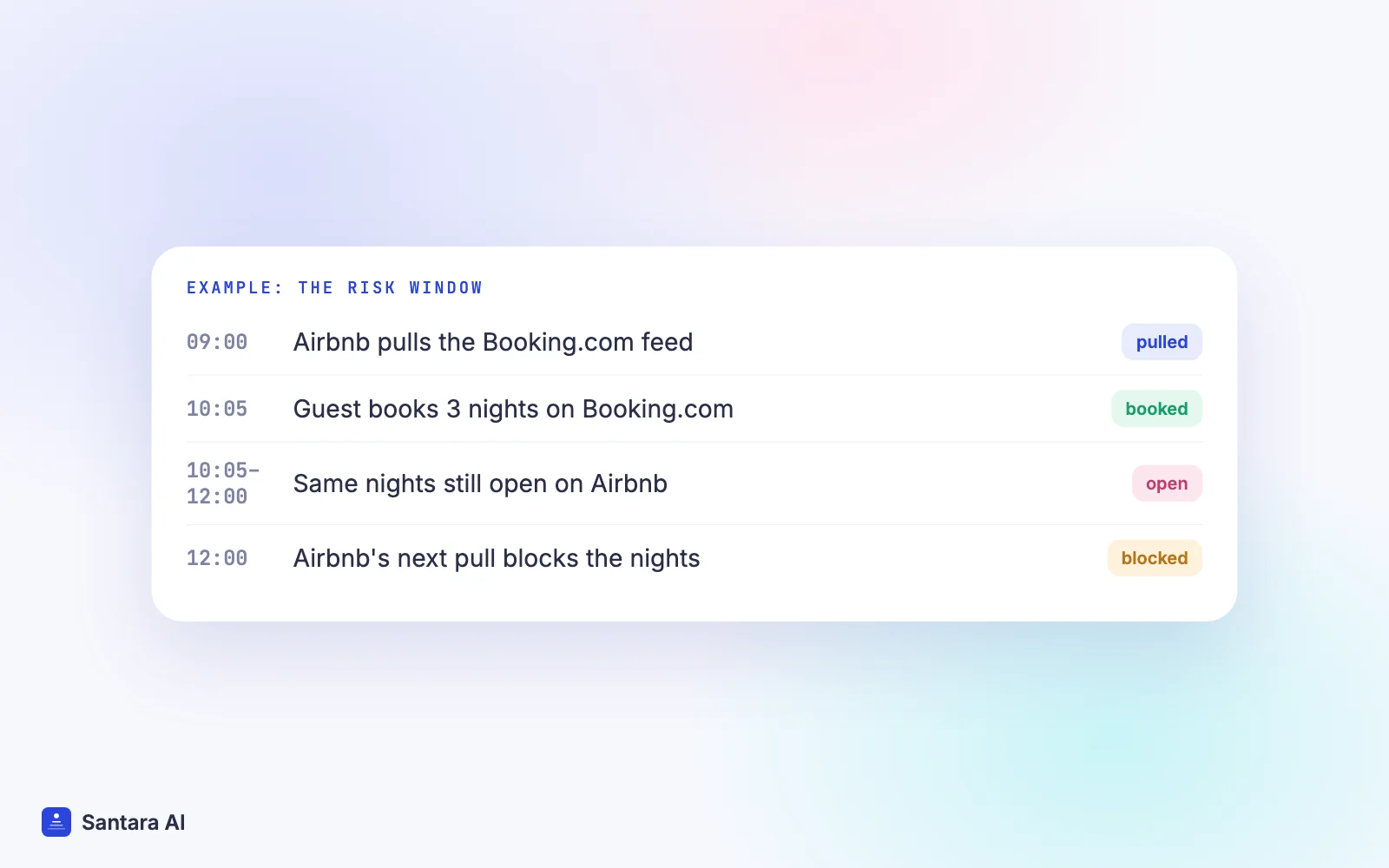
A guest books on Booking.com at 10:05. Airbnb's last automatic pull of your Booking.com feed was at 09:00, so the next one is due around 12:00. From 10:05 to 12:00, nearly two hours, Airbnb still sells those nights. If Airbnb had pulled at 10:00, the window would be almost three hours.
Now reverse it. A booking lands on Airbnb. Booking.com imports every two hours, so the window there is up to two hours.
Three things follow from this:
- The worst case equals the importer's interval. Up to 3 hours open on Airbnb, up to 2 hours on Booking.com, unknown on Agoda.
- On average you are exposed for about half the interval, because a booking lands at a random point between two pulls. Half of three hours is still ninety minutes.
- Every extra channel adds its own window. With three sites, each booking opens a gap on two other sites at once, each on its own clock.
The window only hurts when someone else books the same nights inside it. That is why the same setup feels fine in May and fails in late December, during Songkran in Phuket, or on a long weekend in Da Nang, when last-minute searches for the same dates pile up.
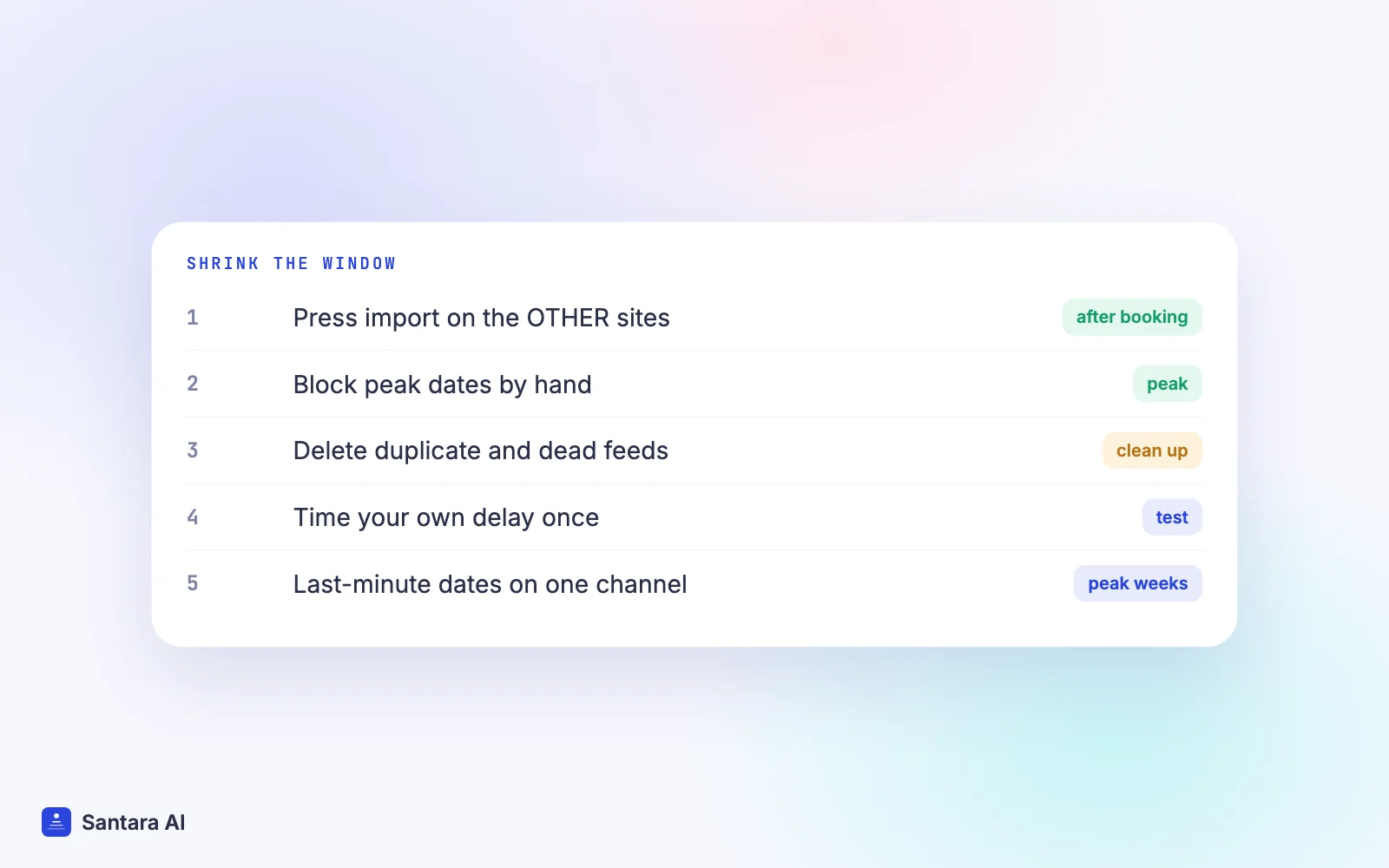
How to shrink the window
You can't change a platform's schedule. You can change what you do inside it.
Step 1
Pull on the other sites after every booking
Make it a habit tied to the booking email: open each other site and press its import button. On Booking.com that is Import now, on Airbnb Refresh, on Agoda Refresh connections. This turns a two or three hour window into the time it takes you to see the email.
Step 2
Block peak dates by hand straight away
For high-demand nights, don't wait for any import. Block the dates manually on the other sites the moment a booking arrives. When the iCal import catches up, the dates are simply already closed.
Step 3
Remove duplicate and dead feeds
Open each site's calendar sync page. Delete any feed imported twice, any link from an old tool, and any connection with an error status. Booking.com shows statuses such as "Service error"; Airbnb shows when each calendar last updated. A feed that stopped updating is worse than a slow one.
Step 4
Time your own delay once
Block a quiet date on site A, note the time, and check when it appears on site B. Then unblock it. Now you know your real window instead of guessing.
Step 5
Keep last-minute dates on one channel in peak weeks
If you get many same-week bookings, consider closing the next few days on your secondary sites during peak periods. Fewer channels selling the same night means fewer chances of a race.
What about buffer nights? A blocked night between stays protects your turnover, not your calendar. It does not stop two guests booking the same night inside the iCal window. Airbnb's help page notes that nights blocked by preparation time and advance notice are included in what it exports, so those settings travel. But they don't make anything arrive sooner.
When to switch to an API channel manager
iCal stays workable for one or two single-unit listings on two channels in a quiet season. Consider a direct connection when:
- You sell more than one identical unit. Booking.com and Agoda calendar sync is only available for one unit per room type, so iCal is not even an option there.
- You sell on three or more sites, so each booking opens two or more windows.
- Peak season brings same-week bookings and you can't watch every email.
- A double booking has already cost you a day of apologies and rebooking.
A direct connection does not wait for the other site's pull. Your software sends the change to each channel through that channel's own connection. There is still a short processing gap, so it is not perfect, but you are no longer waiting hours for someone else's schedule. Our guides to the Airbnb channel manager and Booking.com channel manager explain how those connections work on each site.
How Santara AI handles calendar delay
Santara AI replaces both the PMS and the channel manager, and it uses direct connections to channels, not iCal feeds. It does not offer iCal import or export as a feature.
- One calendar per room is the source of truth. Every connected channel is fed from it. See how the calendar works.
- Bookings come in, availability goes out. New bookings, modifications and cancellations from every connected channel land on the same calendar, and a booking on one channel lowers availability on all the others. Nobody has to press an import button.
- More than dates is sent. Availability, nightly rate, minimum stay, maximum stay, closed to arrival, closed to departure and stop sell go to connected channels.
- Updates are queued with retries. If a channel rejects an update, it is recorded, not silently dropped.
- Unit count caps availability. A one-unit room can never be offered as two.
Airbnb, Booking.com, Agoda, Expedia, Trip.com, Traveloka, Tiket.com, Google Vacation Rentals and the rest of the 54 channels connect from the app. See all integrations.
What a direct connection doesn't remove
Double bookings become rare, not impossible. The remaining causes are a channel that rejects or delays an update on its side, two guests booking within the same short processing gap, a wrong unit count, and an old iCal import left running on an OTA after you connect. Delete those old imports when you switch.
FAQ
How often does Airbnb sync an imported iCal calendar?
Airbnb's help centre says your Airbnb calendar automatically updates every 3 hours from connected calendars. You can press Refresh sooner, but Airbnb limits how many times it can request updates.
Why is my Booking.com calendar not updating from Airbnb?
Booking.com imports connected calendars every two hours and says changes can take up to two hours. Press Import now on the Sync calendars page, and check the connection status for errors.
Does pressing Refresh on Airbnb update Booking.com?
No. Refresh only pulls other calendars into Airbnb. To update Booking.com, press Import now in the Booking.com extranet.
How do I stop iCal sync delays causing double bookings?
Pull on the other sites after every booking, block peak dates by hand, remove dead feeds, or move to a direct channel connection, which doesn't wait for another site's schedule.
Keep reading
- Airbnb and Booking.com without double bookings
- Switch channel manager without losing bookings
- Agoda channel manager guide
Your first 3 months are free.
Join For Free