Tiket.com channel manager: connect TIX without double bookings
Who books on Tiket.com, how the TIX extranet connects to a channel manager, Calendar Sync vs a real connection, payouts, and how Santara AI handles Tiket.com.
 Tai Pham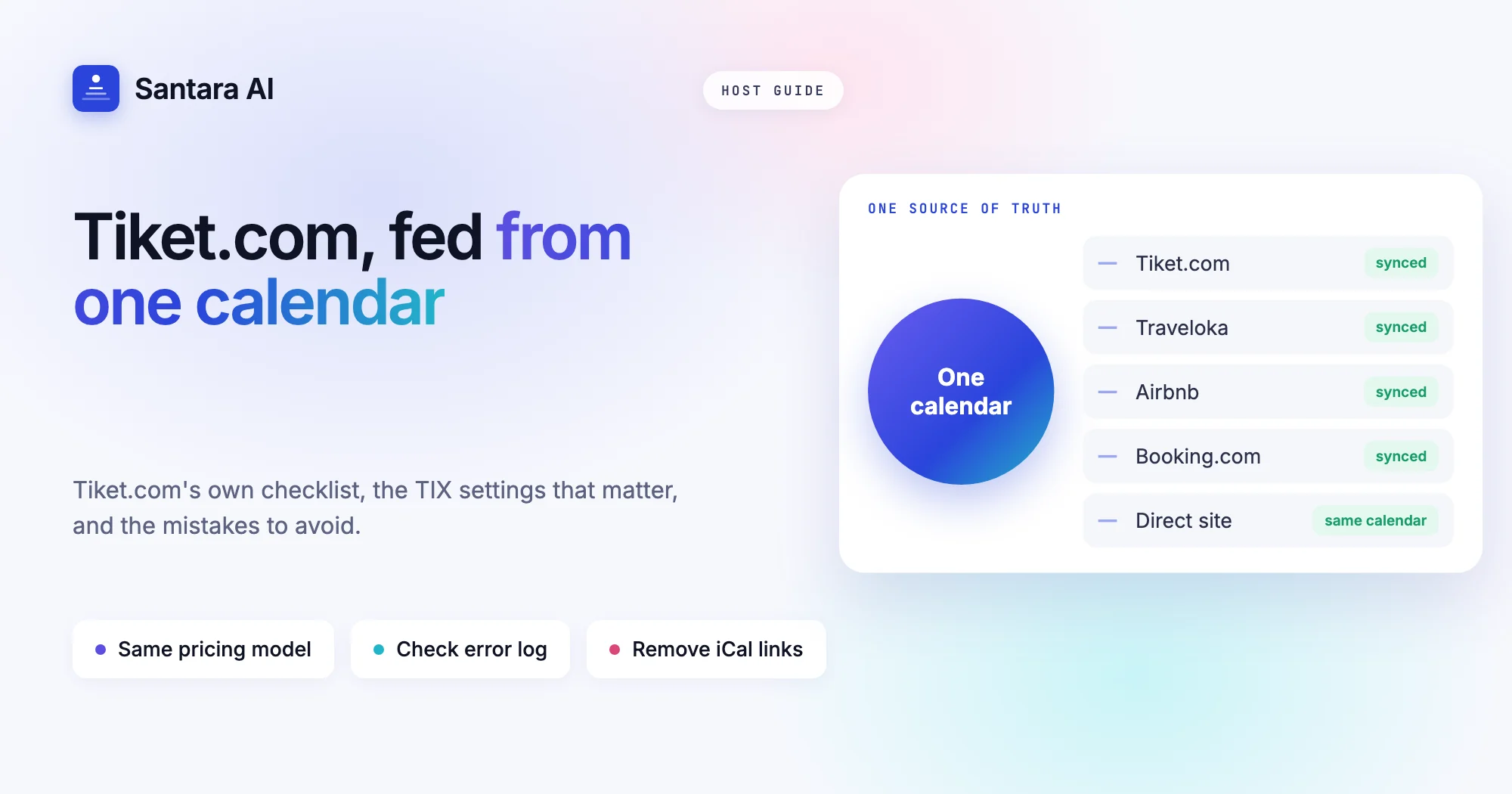
If you host in Bali, Lombok, Yogyakarta or anywhere Indonesian travellers go, Tiket.com belongs on your list of channels. It is an Indonesian travel app where people book flights, trains, events and stays in one place. A Tiket.com channel manager lets you add that audience without adding a calendar you update by hand: one calendar feeds Tiket.com and your other channels, so a night sold in one place closes everywhere.
Tiket.com is managed in its own extranet, called TIX (tix.tiket.com). Its connection flow is simpler than most OTAs on the surface: you pick your channel manager from a menu and click Add. The details around it are where hosts get stuck: the pricing model, a built-in iCal option that only some properties can use, and a rule about removing a channel manager that surprises people when they switch tools.
This guide covers who books on Tiket.com, how TIX connects to a channel manager according to Tiket.com's own help centre, what to check first, the mistakes that still cause trouble after you connect, and how Santara AI handles Tiket.com, including what it does not do.
Who books on Tiket.com
Tiket.com's partner page gives its own breakdown of guests: 58% families and couples, 26% business travellers and 16% solo travellers. For a villa host, that family and couple share is the interesting part. Think of a family from Jakarta booking a two-bedroom villa in Seminyak for the school holidays, or a couple from Surabaya taking a long weekend in Ubud.
The same page says you can register hotels, resorts, villas, apartments and other accommodation. The help centre's property types article puts villas and apartments in a category with 14 property types, including vacation homes and glamping. Registration has three steps: create an extranet account (one account can manage several properties), fill in your property details, then set your rate plans and availability so the property can go live.
How many bookings Tiket.com brings depends on your location, price and reviews. If most of your guests come from Europe or Australia, it may matter less. If you get domestic Indonesian travellers, especially around Lebaran, Natal and school holidays, it is worth connecting properly.
How Tiket.com connects to a channel manager
Tiket.com's help centre explains the connection in one short article. Before you connect, it asks you to check four things:
| Tiket.com's checklist | Why it matters |
| All room types are complete and active | Inactive room types cannot be mapped |
| All rate plans are complete, linked to a room type and active | Only linked, active rate plans receive your prices |
| Your pricing model matches what your channel manager supports | A mismatch sends prices that mean something different |
| With occupancy-based pricing, automatic price reduction is turned off on all rate plans | Otherwise Tiket.com changes the price you sent |
Then you open the Connectivity menu, choose your channel manager from the dropdown, click Add and Continue. Room and rate plan mapping happens afterwards in the channel manager. Once mapped, Tiket.com says rates and availability update from the channel manager and each reservation is sent to it.
Two details matter later. First, the Connectivity menu only lets you add a channel manager. To change or remove one, Tiket.com says to contact your Market Manager or email hotelconnectivity@tiket.com. Plan for that if you ever switch tools. Second, TIX has a Channel Manager Dashboard with a Reservation Error Log: a list of Tiket.com bookings that did not reach your channel manager, with a Resolve button to resend them. Few hosts know it exists.
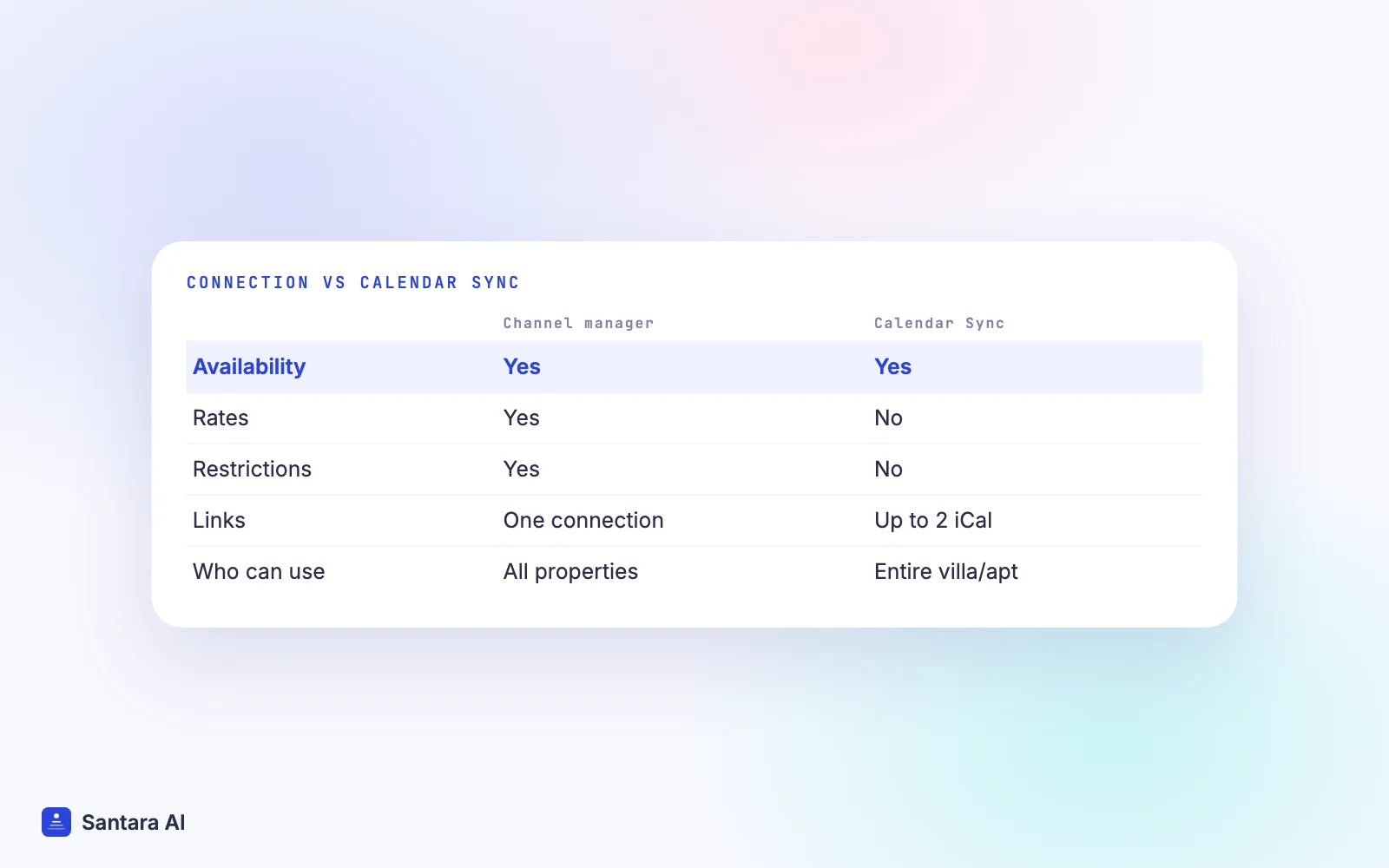
Pricing model, iCal and payment on Tiket.com
Pricing model. Tiket.com has two pricing models. Room-based pricing charges one rate per room whatever the number of guests, and it is the default. Occupancy-based pricing changes the rate with the number of guests. Tiket.com says that if you use a channel manager, use the same model in the extranet and in the channel manager. For most villas that sell the whole house at one price, room-based is the simpler choice.
Calendar Sync is iCal, not a channel manager. TIX has a Calendar Sync feature where you import up to two iCal links from other OTAs. It is only available for villas and apartments that rent the entire place and already use iCal elsewhere. Tiket.com itself says it only updates availability, while a channel manager also updates allotment, rate plans and policies. The help centre does not state how often it refreshes. If you move to a channel manager, remove these iCal links so two systems are not closing the same dates. Our post on iCal vs a channel manager explains the gap.
Payment. Tiket.com's payment article lists two ways to get paid: virtual credit card (VCC) or bank transfer. By bank transfer, properties in Indonesia are paid on the guest's check-out date, and properties outside Indonesia are paid weekly, with no invoice needed from you. A VCC is valid up to 60 days after check-in. Changing your payment method goes through your Market Manager.
Tiket.com channel manager pitfalls to avoid
Connecting Tiket.com makes double bookings rare, not impossible. These are the mistakes that keep causing them. If calendar sync is new to you, read what a channel manager is and how calendar sync works first.
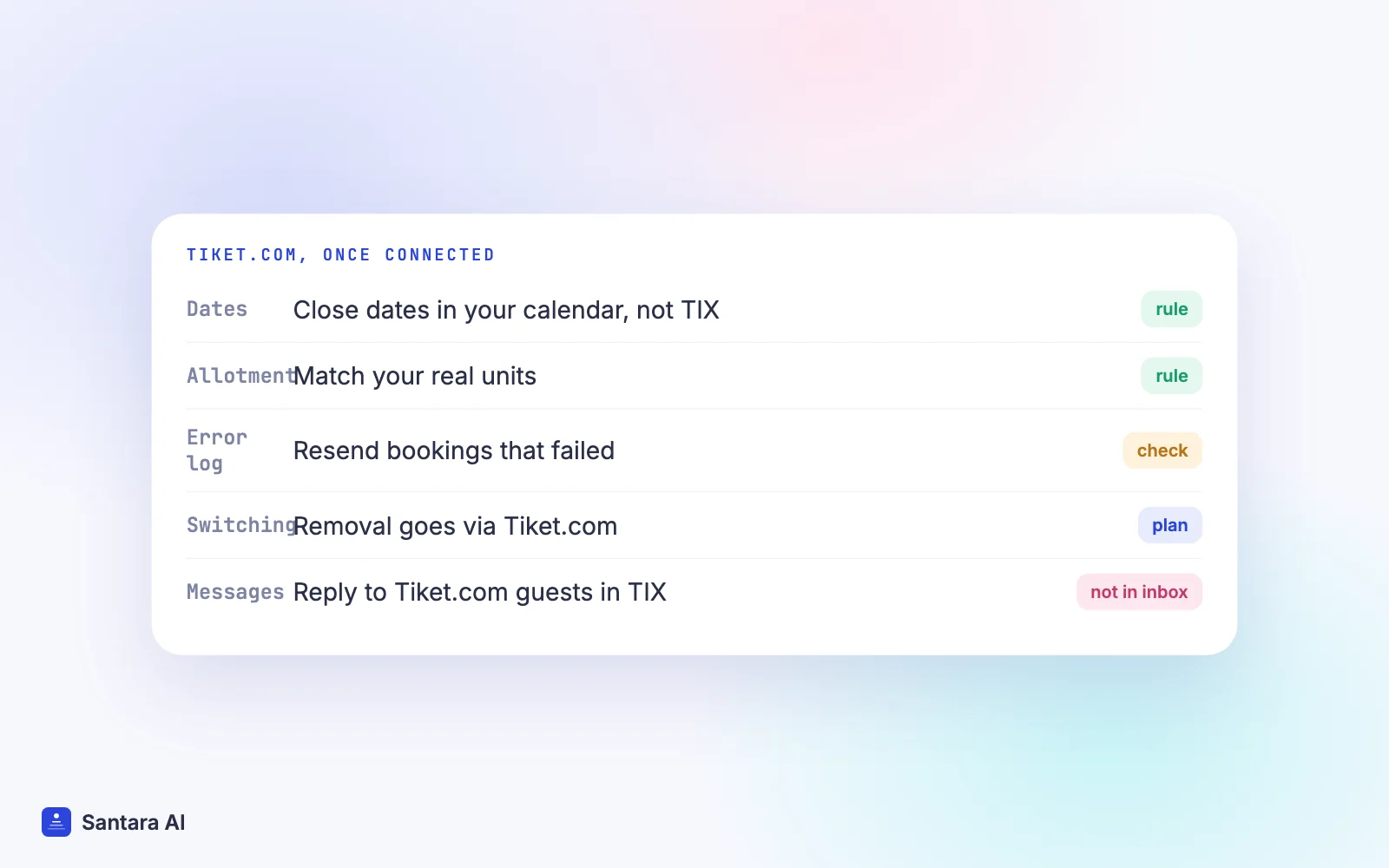
Closing dates by hand in TIX. Tiket.com lets you close out a room type or set closed to arrival and departure in its own calendar. Once a channel manager feeds Tiket.com, a date closed only in TIX is closed only on Tiket.com. Your other channels still sell it, and the next update can reopen it. Close dates in the calendar that feeds every channel.
Allotment that does not match your real units. Tiket.com calls the number of rooms it can sell the allotment. If you have one villa and the allotment says three, Tiket.com can sell it three times. Match it to your real units.
Leftover Calendar Sync links. An old iCal import still running next to a channel manager is two systems editing one calendar. Delete the imported links.
Ignoring the Reservation Error Log. If a booking fails to reach your channel manager, its dates stay open elsewhere. Check the log after you connect and whenever a booking looks missing.
Switching tools without telling Tiket.com. Because you cannot remove a channel manager yourself, arrange the change with your Market Manager before you cut over. Our guide on switching channel manager without losing bookings covers the order of steps.
How Santara AI works as your Tiket.com channel manager
Santara AI replaces both the PMS and the channel manager. Each room has one calendar, and every connected channel is fed from it. Tiket.com is one of the 54 channels you can connect.
Step 1
Find Tiket.com in the channel catalogue
Search for Tiket.com by name in the in-app channel catalogue and start the connection. The guided setup in Santara AI shows the steps Tiket.com requires.
Step 2
Map each room type to a room
Match each Tiket.com room type to the room in Santara AI that it really is, the same room your Airbnb or Booking.com listing feeds. One real room, one calendar.
Step 3
Confirm the unit count
Before anything is pushed to a live listing, you confirm how many identical units each room sells. Availability is capped at that number, so a 1-unit villa can never be offered as 2.
Step 4
Go live and check one booking
Going live is your step. Afterwards, compare an upcoming Tiket.com booking with the calendar and check its dates are closed on your other channels.
Once live, availability, nightly rate, minimum stay, maximum stay, closed to arrival, closed to departure and stop sell push from the one calendar. Tiket.com bookings, changes and cancellations land on the same calendar and lower availability on your other channels. Updates go through a queue with retries; if a channel rejects an update, it is recorded so you can see it, not silently dropped. A zero or placeholder price is never pushed. The integrations page lists Tiket.com with Airbnb, Booking.com, Agoda, Traveloka, Expedia, Trip.com and Google Vacation Rentals.
What Santara AI does not do with Tiket.com
Tiket.com guest chats do not come into the Santara AI inbox. Only Airbnb, Booking.com and Expedia messages arrive there, so reply to Tiket.com guests in the TIX chat. Santara AI sends the same price and minimum stay to every channel; it does not set Tiket.com-only prices. It does not handle your Tiket.com payouts. It never creates your Tiket.com listing: you connect the property you already have, and disconnecting stops sync without deleting the listing or its reservations.
FAQ
Does Tiket.com work with a channel manager?
Yes. In the TIX extranet you choose your channel manager in the Connectivity menu and click Add, then map rooms and rate plans in the channel manager. Check that your tool lists Tiket.com first.
Can I list a villa on Tiket.com?
Yes. Tiket.com accepts villas and apartments, in a category of 14 property types that also includes vacation homes and glamping.
How do I remove or change my channel manager on Tiket.com?
The Connectivity menu only adds a channel manager. To change or remove one, contact your Tiket.com Market Manager or email hotelconnectivity@tiket.com.
Can I answer Tiket.com guests in Santara AI?
Not today. Tiket.com bookings sync to the Santara AI calendar, but Tiket.com chats do not. Reply in the TIX extranet.
Keep reading
- Agoda channel manager: connect Agoda without double bookings
- Airbnb and Booking.com without double bookings
- Why your iCal sync is late
Your first 3 months are free.
Join For Free