Traveloka channel manager: connect TERA without double bookings
Who books on Traveloka, how TERA connects to a channel manager, the minimum-stay and rate plan rules that trip hosts up, and how Santara AI handles Traveloka.
 Tai Pham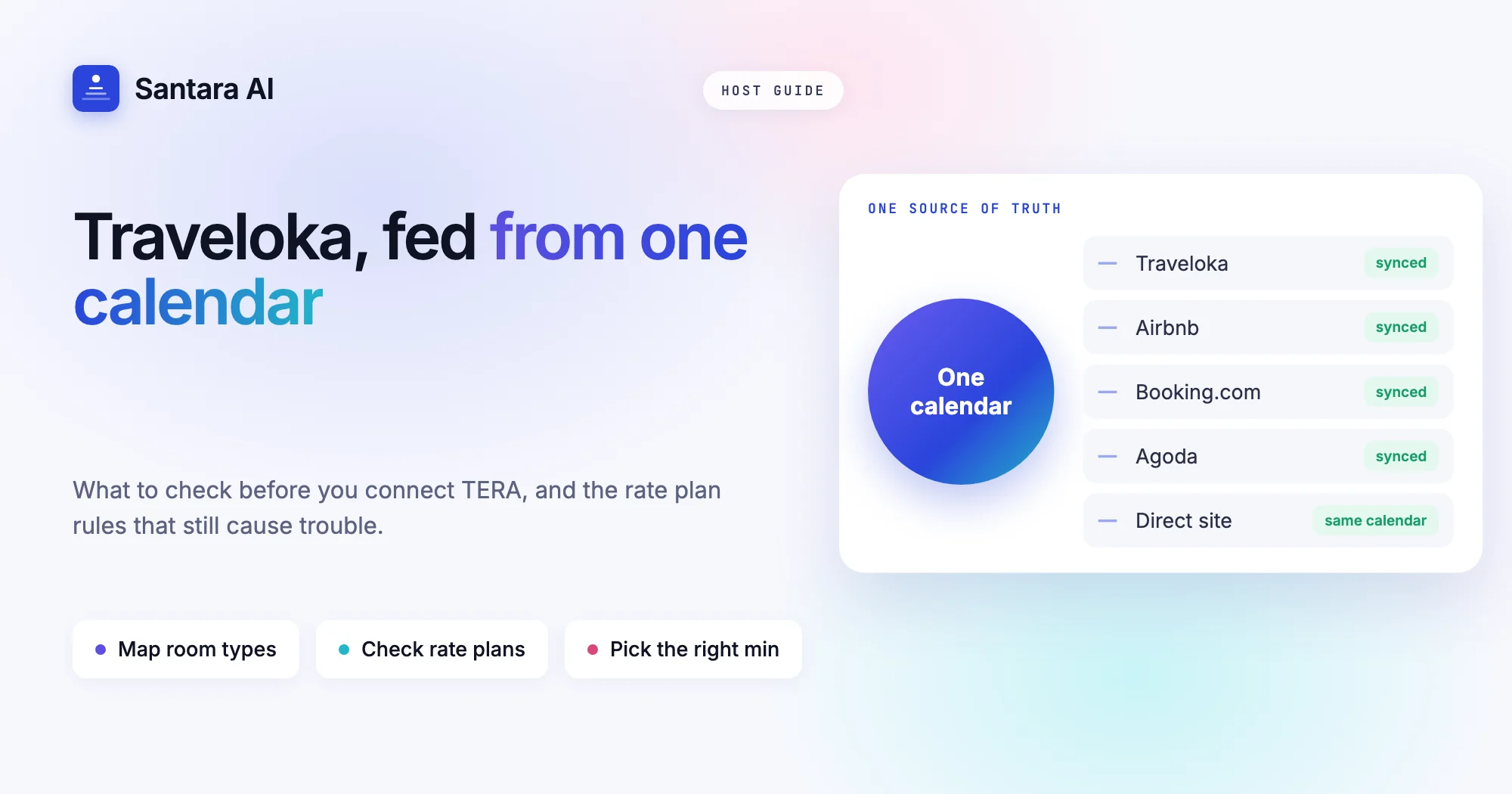
If your guests come from Indonesia, Vietnam, Thailand, Malaysia or the Philippines, many of them book their trips on Traveloka. It is a travel app built in Southeast Asia, and for a lot of regional travellers it is where flights, trains and hotels all get booked. A Traveloka channel manager lets you sell on Traveloka without running one more calendar by hand: one calendar feeds Traveloka and your other channels, so a night sold anywhere closes everywhere.
Traveloka is managed through its own extranet, called TERA. Like Agoda, it works in room types and rate plans rather than single listings, and its connection rules have a few details that catch hosts out, especially around minimum stays and how restrictions attach to rate plans.
This guide covers who books on Traveloka, how TERA and its channel connections work according to Traveloka's own partner pages, what to check before you connect, the Traveloka-specific mistakes that still cause trouble afterwards, and how Santara AI handles Traveloka, including what it does not do.
Who books on Traveloka
Traveloka's partner page describes it as having a strong presence in Indonesia, Malaysia, Thailand, Vietnam and the Philippines. Many of its users open the app for a flight or a train ticket and add the stay in the same session. That makes it strong for domestic and regional trips: a family from Jakarta flying to Bali for a long weekend, or a group from Ho Chi Minh City heading to Da Nang for a holiday.
The same page lists the property types Traveloka accepts, and the list goes well beyond hotels: villa, apartment, homestay, guest house, house, bed and breakfast and more. So a single villa in Canggu or a three-room homestay in Da Lat can list there. Registration starts in TERA: you create an account, fill in the property form, and a Traveloka Market Manager contacts you to check the details, rates and availability. Traveloka states there is no fee to register.
What you cannot assume is how many bookings Traveloka will bring. That depends on your location, your price and your reviews. Treat it as one more door into the same rooms. It is worth opening if you can keep it in sync, and risky if you cannot.
How TERA and the Traveloka connection work
TERA (Traveloka Extranet Reservation System) is where you manage rooms, prices, availability and bookings. Traveloka's partner page says TERA is "integrated with various channel managers", and it works on the website and in a mobile app.
Traveloka's connectivity documentation adds details that matter to hosts, even though it is written for software providers:
| What Traveloka says | What it means for you |
| Restrictions are supported on the rate plan level only | Minimum stay and closed dates attach to rate plans, so every rate plan that sells needs to be connected |
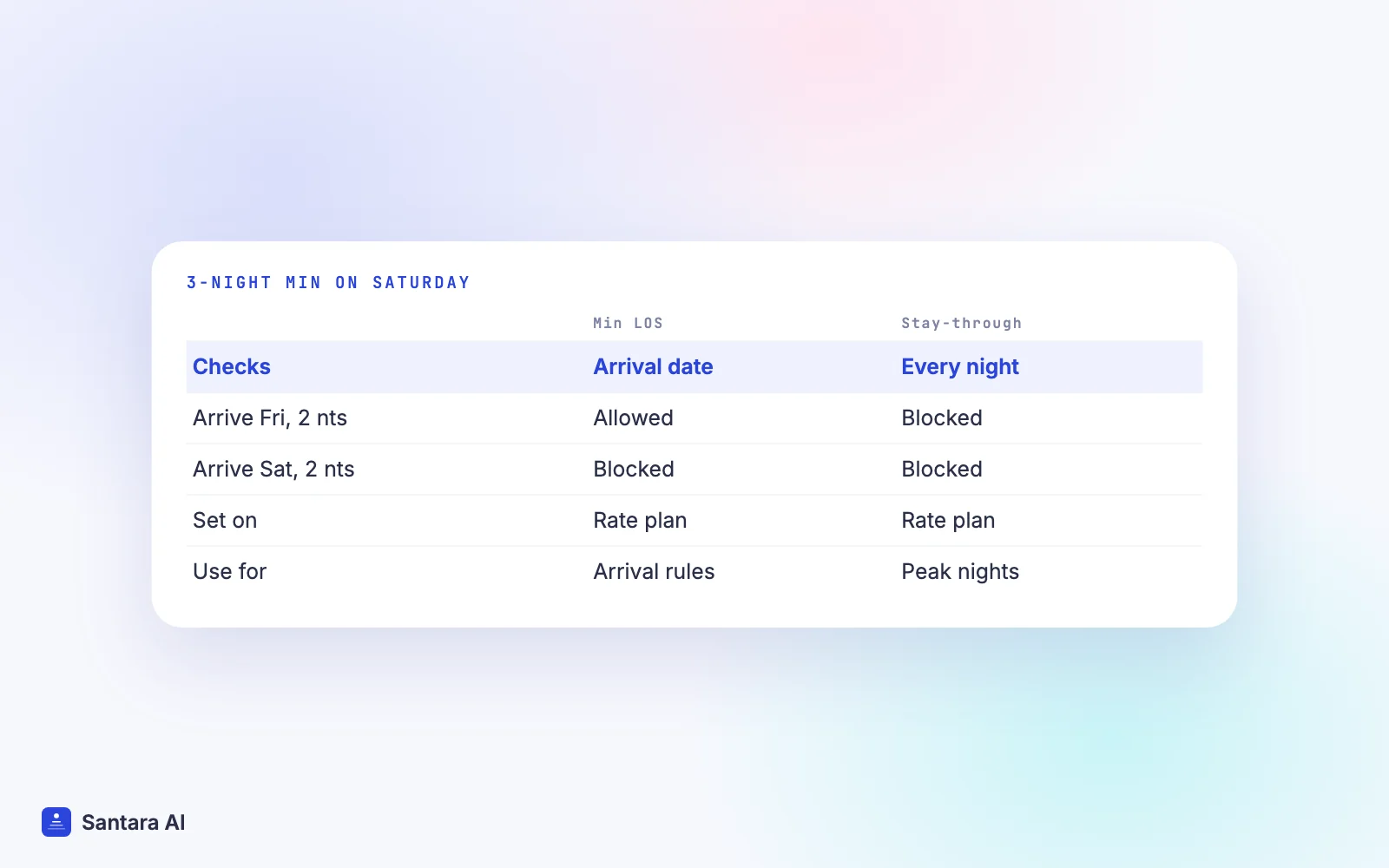
| Min LOS applies only to the arrival date | A 3-night minimum on Friday only affects bookings that check in on Friday |
| Min Night for Stay-Through applies to every night of the stay | If any night in a booking carries the rule, the whole booking must meet it |
| Room-based and occupancy-based pricing both exist | Your channel setup and TERA must use the same pricing model |
| A booking cannot include multiple room types | A group needing two different villas arrives as separate bookings |
| Payment to the property: Direct Bill or VCC | How you get paid depends on your contract, not on the channel manager |
The two kinds of minimum stay are the detail most hosts miss. If you put a 3-night minimum on the Saturday of a long weekend and expect every booking that includes Saturday night to be three nights, you need the stay-through version. The arrival-only version still lets a guest arrive on Friday and stay two nights, Friday and Saturday.
Payment also differs by booking. Traveloka offers guests a Pay at Hotel option where, in Traveloka's own words, "payment for the booking will have to be made directly to the property" (Traveloka Help Center). If you accept those bookings, your staff need to know to collect payment on arrival.
What to check before connecting Traveloka
Whatever tool you use, run through this list first. If calendar sync itself is new to you, start with what a channel manager is and how calendar sync works.
- You can sign in to TERA. The connection belongs to your Traveloka account. If an agent or a former manager set it up, get the login back first.
- You know your Market Manager. Traveloka assigns one during registration. Ask them how a channel connection is activated for your property, since the steps can differ by market.
- Each room type matches one real room. A TERA room type mapped to the wrong room closes the wrong dates.
- The number of rooms is right. If you have two identical villas, the room type should sell two, not five.
- You know which rate plans sell. Because restrictions live on rate plans, an unconnected rate plan can keep selling with old rules.
- Future Traveloka bookings are written down. After connecting, check that each one shows on your new calendar.
- No other tool sends updates to TERA. Two tools pushing to one channel overwrite each other.
If you have been using iCal links to keep calendars in step, plan to remove them once the real connection is live. iCal carries blocked dates only, with no prices and no minimum stays, as our post on iCal vs a channel manager explains.
Traveloka channel manager pitfalls to avoid
Connecting Traveloka makes double bookings rare, not impossible. These mistakes cause most of the trouble that remains.
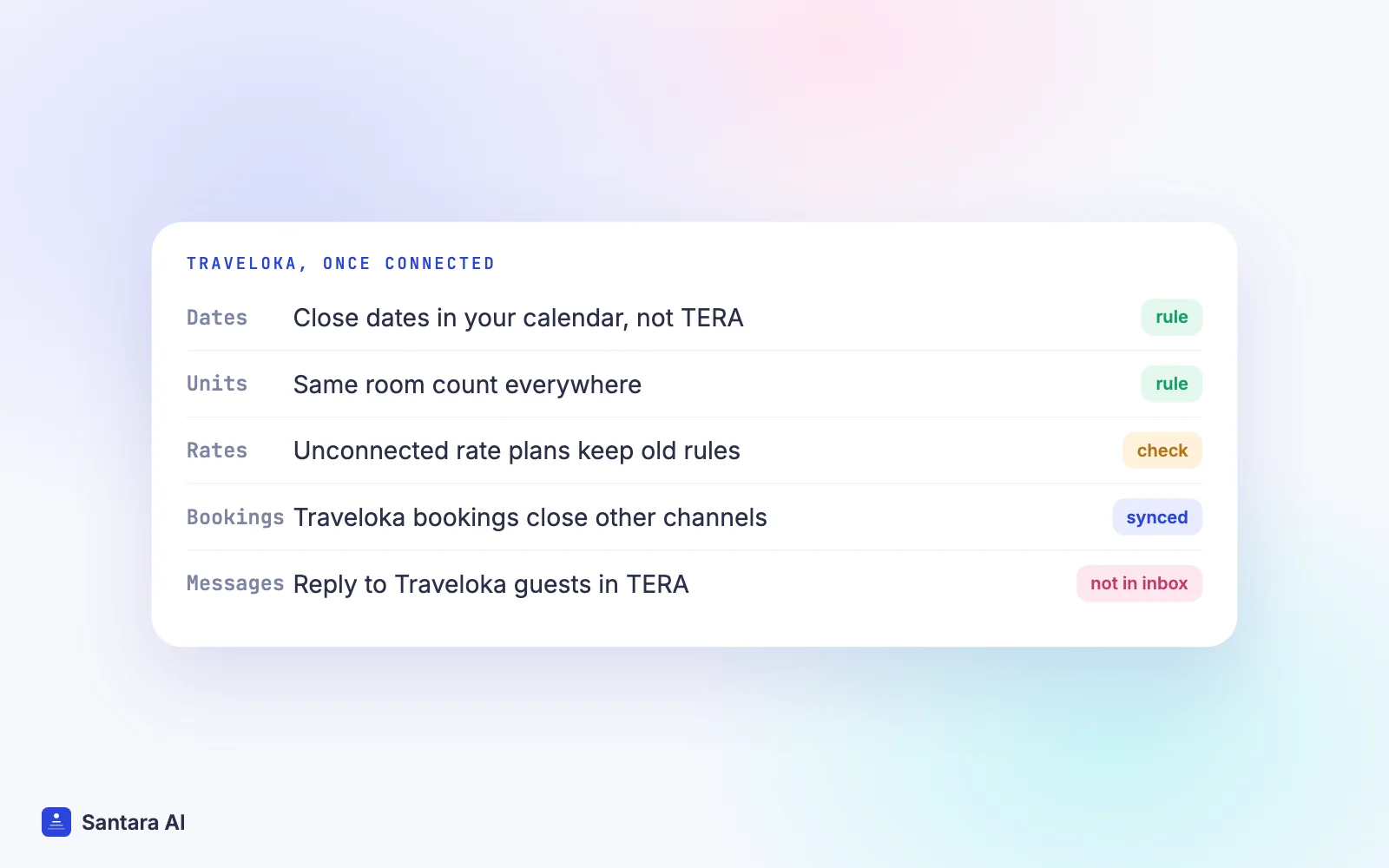
Editing dates by hand in TERA. Once Traveloka is fed from your channel manager, a date you close only inside TERA stays closed only on Traveloka. Other channels keep selling it, and the next update from your calendar can reopen it. Close dates in the calendar that feeds every channel.
Leftover rate plans. A promotional rate plan created for last year's holiday may still be bookable. If it is not connected, it does not receive your current minimum stay or closed dates. Remove or close rate plans you no longer use.
The wrong kind of minimum stay. As above, arrival-only and stay-through minimums behave differently. Decide which one you mean for each period before peak season, not during it. Our guide on syncing prices and minimum stay across channels goes deeper.
Pricing model mismatch. If TERA prices by occupancy but your channel setup sends one price per room, guests may see a price you did not intend. Pick one model and keep it the same on both sides.
Pay at Hotel surprises. A Pay at Hotel guest who arrives expecting to pay at check-in is normal on Traveloka. If your team only handles prepaid bookings, check each booking's payment type on the arrivals list.
One cause remains even with a clean setup: two guests booking the same night on two channels in the short window before the update reaches the other side. If it happens, our guide on what to do after a double booking walks through the first hour.
How Santara AI works as your Traveloka channel manager
Santara AI replaces both the PMS and the channel manager. Each room has one calendar, and every connected channel is fed from it. Traveloka is one of the 54 channels you can connect.
Step 1
Find Traveloka in the channel catalogue
Search for Traveloka by name in the in-app channel catalogue and start the connection. The guided setup in Santara AI shows the steps Traveloka requires.
Step 2
Map each room type to a room
Match each TERA room type to the room in Santara AI that it really is, the same room your Airbnb or Booking.com listing feeds. One real room, one calendar.
Step 3
Confirm the unit count
Before anything is pushed to a live listing, you confirm how many identical units each room sells. Availability is capped at that number, so a 1-unit villa can never be offered as 2.
Step 4
Go live and check one booking
Going live is your step. Afterwards, compare an upcoming Traveloka booking with the calendar and check its dates are closed on your other channels.
Once live, availability, nightly rate, minimum stay (on arrival or through the stay), maximum stay, closed to arrival, closed to departure and stop sell push from the one calendar. Traveloka bookings, changes and cancellations land on the same calendar and lower availability on your other channels. Updates go through a queue with retries; if a channel rejects an update, it is recorded so you can see it, not silently dropped. A zero or placeholder price is never pushed. The integrations page lists Traveloka alongside Airbnb, Booking.com, Agoda, Tiket.com, Expedia, Trip.com and Google Vacation Rentals.
What Santara AI does not do with Traveloka
Traveloka guest messages and requests do not come into the Santara AI inbox. Only Airbnb, Booking.com and Expedia messages arrive there, so keep answering Traveloka guests in TERA. Santara AI sends the same price and minimum stay to every channel; it does not set Traveloka-only prices or markups. It does not handle your Traveloka payouts or Pay at Hotel collection. It never creates your Traveloka listing: you connect the property you already have, and disconnecting stops sync without deleting the listing or its reservations.
FAQ
Does Traveloka work with a channel manager?
Yes. Traveloka's partner page says TERA is integrated with various channel managers. Ask your Market Manager how the connection is activated for your property, and check that your tool lists Traveloka before you sign up.
Can I list a villa or homestay on Traveloka?
Yes. Traveloka's list of accepted property types includes villa, apartment, homestay, guest house and house. You register in TERA and a Market Manager checks the details.
What is the difference between Min LOS and stay-through minimum on Traveloka?
Min LOS applies only to the arrival date. Min Night for Stay-Through applies to every night of the stay, so any booking that includes a restricted night must meet the minimum.
Can I reply to Traveloka guests in Santara AI?
Not today. Traveloka bookings sync to the Santara AI calendar, but Traveloka messages do not. Reply to Traveloka guests in TERA.
Keep reading
- Agoda channel manager: connect Agoda without double bookings
- Airbnb and Booking.com without double bookings
- Switch channel manager without losing bookings
Your first 3 months are free.
Join For Free