Airbnb listing photos: rules, shot list and cover photo order
Airbnb listing photos, plus Booking.com and Agoda rules: each platform's size and count limits, a shot list per room, light, phone settings, cover order and accessibility photos.
 Tai Pham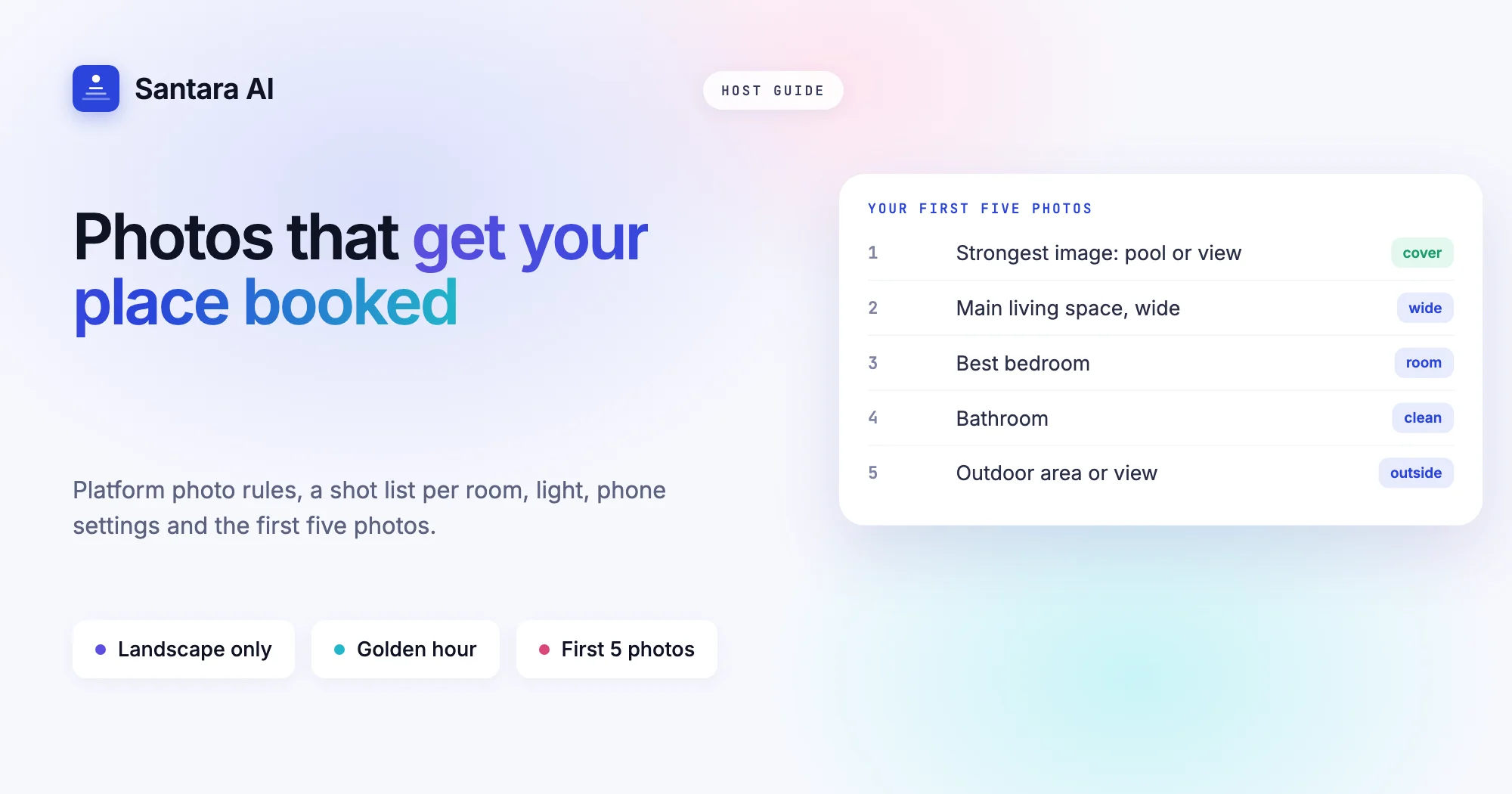
Guests decide with their thumbs. On Airbnb the first photo is the one that shows in search, and on Booking.com and Agoda the main photo does the same job. If it is dark, tilted or shows an unmade bed, most people scroll past before they read a word about your pool or your view of the rice fields.
The good news is that good Airbnb listing photos, and the ones you upload to Booking.com and Agoda, do not need a professional camera. Airbnb's own photo guide says the phone in your pocket is enough. What they need is a plan: a clean space, the right hour of light, a shot list for each room and the right order once you upload. Photos also feed Airbnb's own idea of listing quality, as we explain in how Airbnb search ranking works.
This guide gives you that plan, plus each platform's published photo rules (Airbnb, Booking.com and Agoda), checked on their own help pages on 24 October 2026. Where a platform does not publish a number, we say so.
Airbnb listing photos vs Booking.com and Agoda: the rules
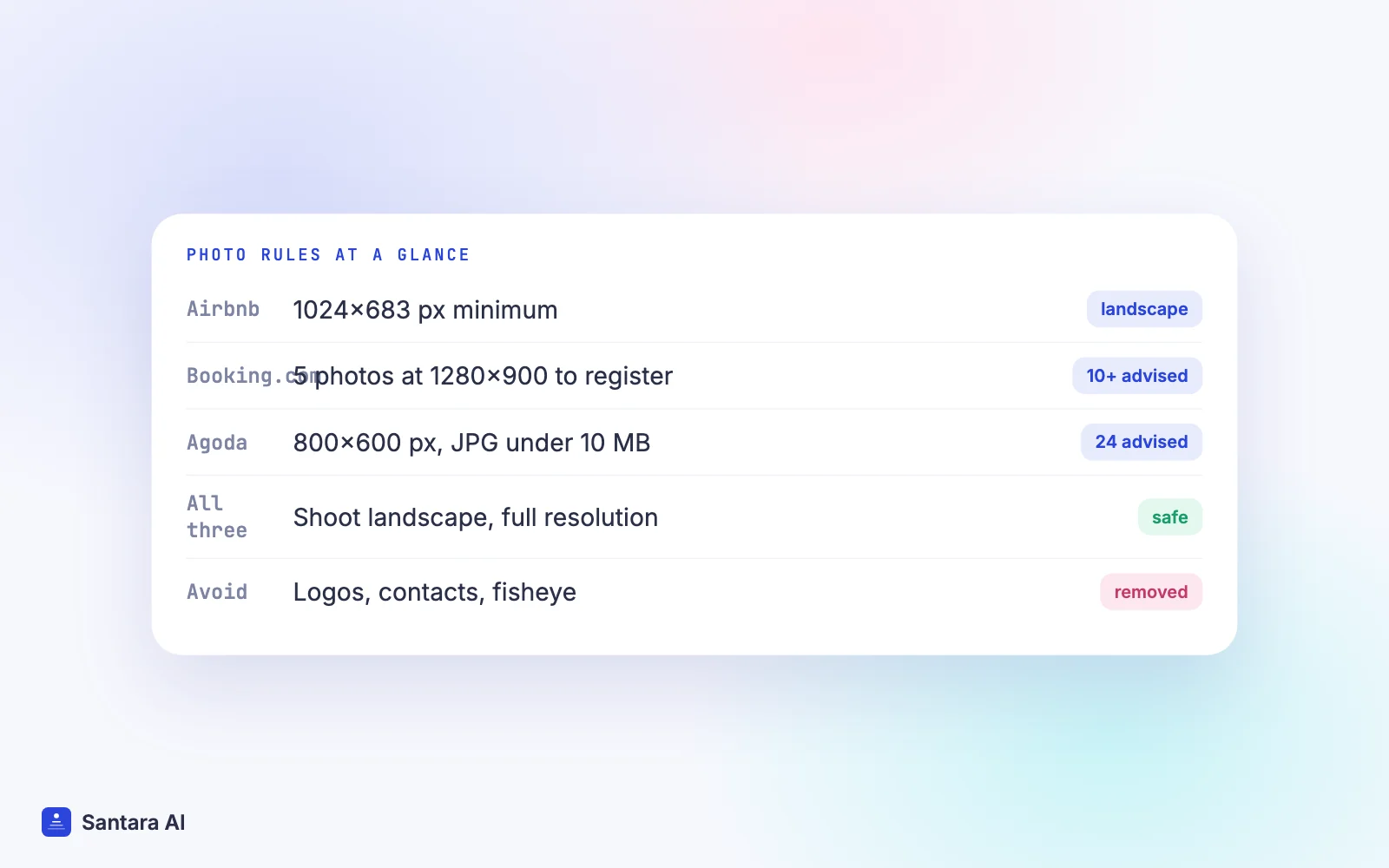
Each platform publishes slightly different minimums. Shoot to the strictest one and the same photos work everywhere.
| Rule | Airbnb | Booking.com | Agoda |
| Minimum size | 1024 × 683 px (help); 1200 × 800 px suggested in its photo guide | 1280 × 900 px to register; 2048 × 1080 px recommended, 4000 × 3000 preferred | 800 × 600 px |
| How many | No published minimum; every room needs one to appear in the photo tour | 5 to finish registration; at least 10 recommended, 4 per room plus a bathroom | 24 recommended, 4–6 per room type |
| Orientation | Landscape | Landscape only | Landscape only |
| File | Up to about 10 MB | PNG, JPEG or JPG under 47 MB at registration | JPG/JPEG under 10 MB |
| Not allowed / avoid | Vertical photos display poorly | Watermarks, logos, contact details, screens, number plates, collages, heavy filters, fisheye | People or animals, other companies' logos, seasonal decorations, views you can't see from the property |
Sources: Booking.com's photo requirements and registration guide; Agoda's which photos do I need and how to take better photos.
The practical rule: shoot landscape, at your phone's full resolution, and keep the originals. A modern phone easily clears 4000 × 3000 pixels, which satisfies all three.
One detail many hosts miss: Agoda says the photos on your Agoda listing can include images you uploaded to Booking.com and Priceline, and that you manage those with the respective partner (Agoda photo help). An old photo on Booking.com may still be showing on Agoda. Our Agoda vs Booking.com comparison covers the other differences between the two extranets.
Prepare the place first
Every platform says the same thing in different words: clean, declutter, open the curtains. Booking.com's checklist is the most specific. Beds freshly made, surfaces tidy, no laundry, no visible cables, lamps on. In bathrooms: clean mirrors, shower curtain open, toilet lid down, no toilet paper or bins in the frame.
For a villa in Bali or a homestay in Da Nang, add a few local items to the list:
- Hide the scooter helmets, the shoe pile at the door and the laundry rack on the balcony.
- Skim the pool and turn on the pool lights if you shoot at dusk.
- Remove anything with your phone number, Instagram handle or a QR code. Booking.com asks you not to upload images that mainly show contact information, personal details or watermarks.
- Take down Christmas or Tết decorations. Agoda lists seasonal decorations as something to avoid, and they date your photos.
Light and time of day
Light matters more than the camera. Airbnb recommends soft natural light: shoot indoor rooms when they get the most daylight, and outdoor shots in the "golden hours", which Airbnb defines as the 60 minutes after sunrise and before sunset. Agoda also says natural light is usually best.
In practice:
- Turn the flash off. Airbnb says so directly. Open every curtain first; if the room is still dark, switch on the lights.
- Shoot away from windows, not into them, or the room goes black and the window goes white.
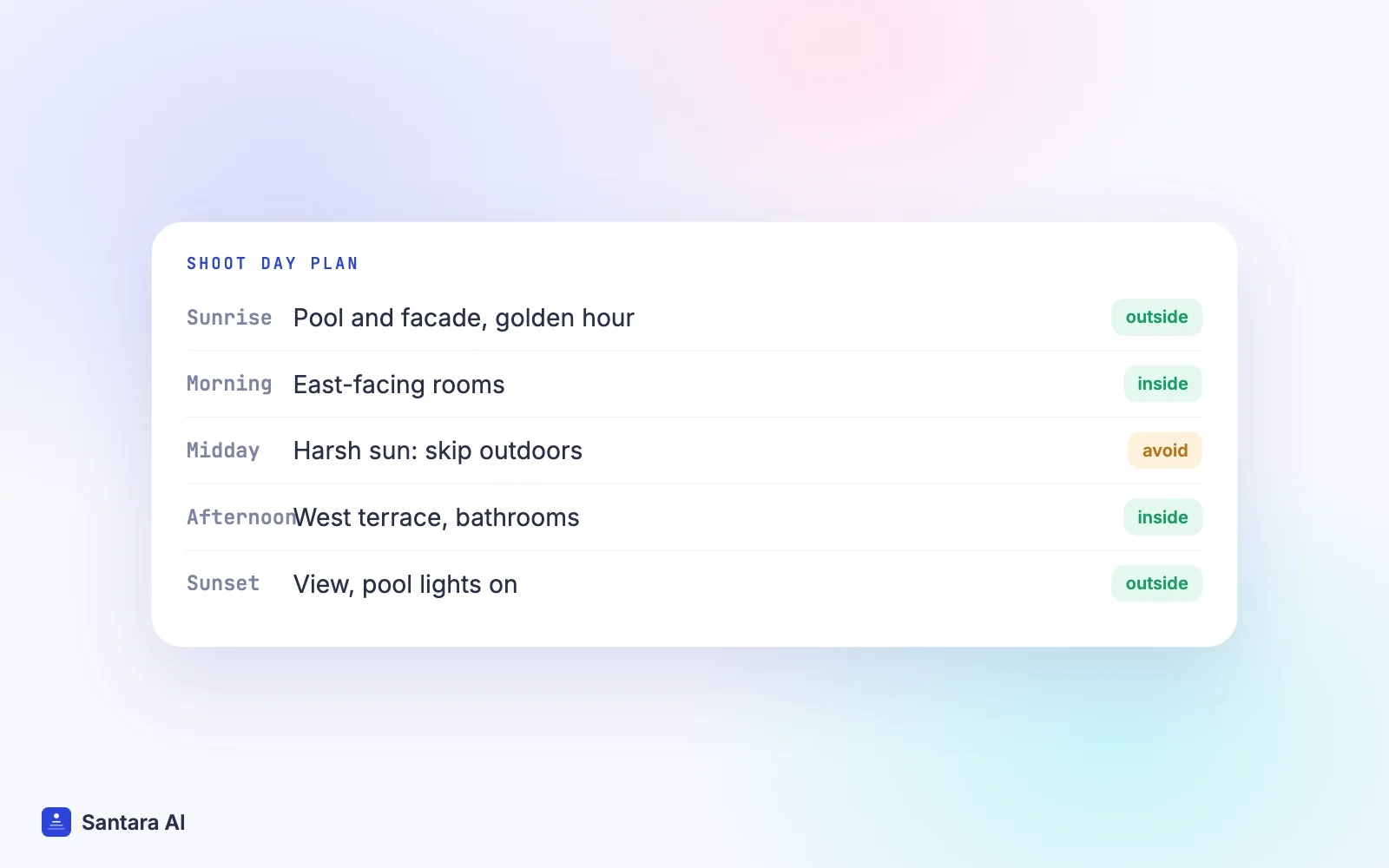
- Plan the day. In the tropics the midday sun is harsh and the shadows are hard. Morning for east-facing rooms, late afternoon for west-facing terraces, golden hour for the pool and the facade.
- Rainy season: wait for a bright overcast hour rather than shooting during a storm. A grey sky over a pool reads as cold.
Phone settings that help
You do not need special apps. These settings come from the platforms' own advice:
- Landscape, always. Airbnb says search results crop photos into squares and the listing page shows them in landscape; Booking.com and Agoda say landscape only.
- Gridlines on. Airbnb suggests a grid to centre the subject and keep lines straight.
- Hold it level at chest height. Airbnb says shoot straight ahead without tilting up or down. Booking.com suggests a camera height of roughly 1 to 1.5 metres and shooting from room corners for depth.
- Main lens, not ultra-wide. Booking.com advises against extreme wide-angle or fisheye shots. The 0.5× lens bends walls and makes rooms look bigger than they are, which guests notice on arrival.
- Light editing only. Airbnb suggests adjusting brightness and contrast and straightening. Booking.com asks you to avoid filters, over-saturation, heavy HDR, collages and black-and-white.
A shot list for every room
Airbnb suggests planning each room and area guests can use from several perspectives: a mix of wide, mid-range and close-up images. Booking.com asks for at least four photos per room or unit and one of the bathroom. Here is a shot list that covers both:
Step 1
Exterior and arrival
The facade or gate from the street, the entrance door, parking, and the path to the door. Guests use these to find you at night.
Step 2
Living and dining
One wide shot from each corner that shows the whole room, then the dining table and any view from the sofa.
Step 3
Each bedroom
A wide shot showing the bed and the window, one from the other side, then close-ups of the bed, wardrobe, desk and air conditioning.
Step 4
Each bathroom
Full room, the shower or bath, and the basin. Hot water heater or rain shower if you have one.
Step 5
Kitchen
Wide shot, then the cooker, fridge, kettle and coffee maker.
Step 6
Outdoor and shared spaces
Pool, garden, terrace, rooftop, laundry area, and the real view from the property, not one from the hill next door.
Agoda lists "misleading images of area landmarks or views that you cannot see from the property" as something to avoid. If you include the beach or the old town, caption it with the walking distance.
Order, cover photo and captions
On Airbnb, the photo tour article says the first five photos are the most important because they are displayed prominently, and the first one is the large image in search. You can drag those five into order and pick a cover photo. Changes can take up to 30 minutes to appear. Airbnb's AI also sorts new photos into rooms, and each room needs at least one photo to appear in the photo tour.
A sensible first five Airbnb listing photos for most places:
Step 1
Your strongest single image: the pool with the villa behind it, the best bedroom, or the view.
Step 2
The main living space, wide.
Step 3
The best bedroom.
Step 4
The bathroom.
Step 5
The outdoor area or the view.
On Booking.com you can set a preferred main photo, and a Smart ordering feature uses machine learning to order photos; you can switch it off if you prefer your own order (Booking.com photo help). Booking.com also suggests tagging photos ("living room", "pool") because tags help match your property to searches. On Agoda you set a property main photo and a main photo for each room type.
Use captions. Airbnb's guide suggests explaining what the photo does not show: "Bedroom 2 is upstairs, reached by a spiral staircase" or "The table seats eight with the leaf extended". A caption that admits the stairs prevents a bad review.
Accessibility photos
Airbnb treats accessibility features differently from normal photos. Its guide How to photograph accessibility features says Airbnb reviews every accessibility feature and photo before it appears in a separate Accessibility features section, and may ask for a different photo.
The main points:
- Step-free entrance: no steps or thresholds higher than 5 cm on the path. Photograph the route every 3 metres from where guests arrive, then the open door from at least 2.4 metres back.
- Wide doorways: at least 81 cm. Show a measuring tape across the frame, plus a close-up of the number.
- Step-free shower: no threshold higher than 2.5 cm, photographed with the camera tilted to the floor.
- Grab bars, shower chair, lit path, parking: separate photos of each.
Many villas with steps to every room will not qualify, and that is fine. Say so honestly in the description and in your house manual. Guests who need step-free access will thank you for it.
How Santara AI fits
Santara AI does not take, edit or upscale photos, and it does not push photos or descriptions to Airbnb, Booking.com or Agoda. You upload photos in each platform's own editor or extranet, using the rules above.
What Santara AI handles is the calendar side. It replaces both the PMS and the channel manager, with one calendar per room. If you need a free day for a photo shoot, close that date in Santara AI and the change goes out to every connected channel, so nobody books the room while the photographer is there. New bookings create cleaning tasks automatically, and the Daily Brief email (6am by default) lists the day's arrivals, departures and cleans, which helps the place look like its photos when each guest walks in.
Keep the photos honest
Photos that oversell a place lead to low accuracy ratings and complaints. Update photos when you renovate or change furniture, and remove any that no longer match.
FAQ
What size should Airbnb listing photos be?
Airbnb's help pages say at least 1024 × 683 pixels, and its photo guide suggests at least 1200 × 800 with files up to about 10 MB. Landscape works best, because search crops to squares and the listing page shows landscape.
How many photos should a vacation rental listing have?
Airbnb publishes no minimum but each room needs a photo for the photo tour. Booking.com requires five to register and recommends at least ten; Agoda recommends 24 plus 4–6 per room type.
Can I take listing photos with my phone?
Yes. Airbnb says most cameras, including smartphones, can take good listing photos. Turn the flash off, shoot landscape, keep the phone level and use the main lens rather than ultra-wide.
Which photo should be my Airbnb cover photo?
Your strongest single image of what makes the place special, often the pool, view or best room. Airbnb shows the cover in search and gives the first five photos the most prominence.
Keep reading
- How to list on Airbnb, step by step
- How to list on Booking.com
- Turnover checklist and cleaning schedule template
Your first 3 months are free.
Join For Free