Homestay management spreadsheet: when to move from Excel to a PMS
A free homestay management spreadsheet layout, the six signs you've outgrown Excel or Google Sheets, and a safe order for moving your bookings to a PMS.
 Tai Pham
A homestay management spreadsheet works well for one or two units on one booking site: it is free, flexible and you already know how to use it. It starts to break when a second OTA arrives, when more than one person edits it, and when an owner wants monthly numbers you have to rebuild by hand. At that point the spreadsheet is no longer the problem you can fix with more columns; you need one calendar that the booking sites read from.
Most small hosts in Southeast Asia start the same way. A Google Sheet or an Excel file for bookings, a WhatsApp or Zalo group for the cleaner, and the Airbnb, Booking.com or Agoda extranet open in three browser tabs. There is nothing wrong with that setup. This guide shows how to get the most out of it (with a template layout you can copy today), the exact signs that you have outgrown it, and how to move to a property management system (PMS) without losing a booking.
What does a spreadsheet do well for a small homestay?
Before you replace anything, be fair to the tool you have. A spreadsheet is:
- Free. Google Sheets costs nothing, and most hosts already have Excel.
- Flexible. You decide the columns, the colours, the notes. Nobody forces a workflow on you.
- Shareable. You can share a Google Sheet with a partner or cleaner, and Google keeps a record of changes: right-click a cell and choose "Show edit history", or click "Last edit" to see versions and who changed what (Google Docs Editors Help).
- Good at sums. Monthly totals by unit or channel are one formula away.
If you run one or two rooms, sell on one channel and do the cleaning yourself, a good spreadsheet may be all you need for now.
A free homestay management spreadsheet template (layout)
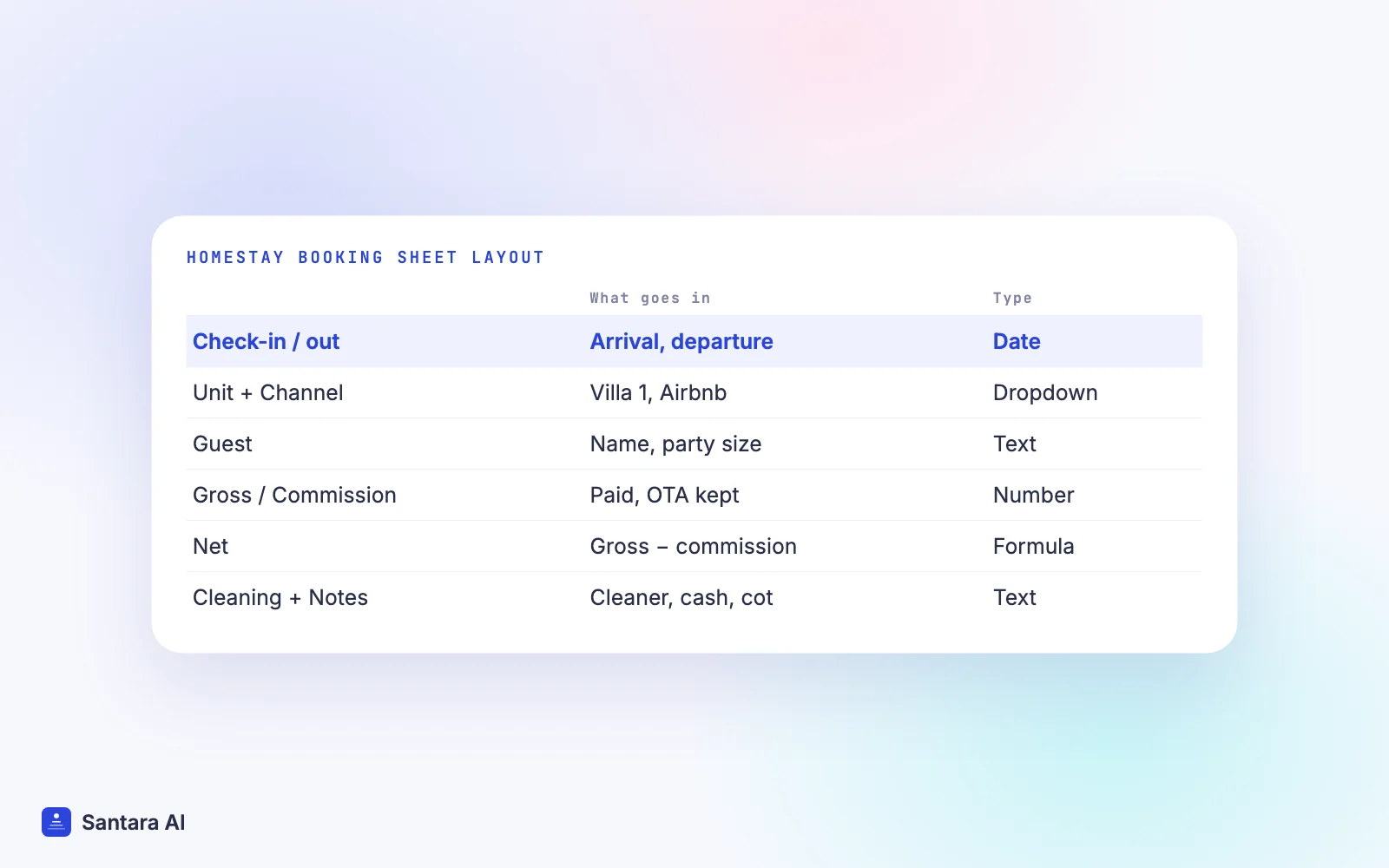
Here is a layout that works in Google Sheets or Excel. One row per booking, never one row per night. Each column has one job.
| Column | What goes in it | Tip |
| Check-in date | Arrival date | Use a real date format so you can sort and filter |
| Check-out date | Departure date | Nights = check-out minus check-in |
| Unit | Room or villa name | Use a dropdown so names never vary |
| Guest | Guest name and party size | First name plus surname is enough |
| Channel | Airbnb, Booking.com, Agoda, direct… | Dropdown again |
| Gross | What the guest paid | Same currency per row; note it if mixed |
| Commission | What the channel kept | Copy from the payout, don't estimate |
| Net | Gross minus commission | A formula, never typed |
| Cleaning | Cleaner name, cost, done yes/no | Feeds your cleaner's weekly pay |
| Notes | Early check-in, cot, deposit, payment method | Cash or bank transfer for direct guests |
Three settings make it much harder to break:
Step 1
Add dropdowns for Unit and Channel
Select the column, then go to Data > Data validation > Add rule and type the allowed values (Google help). "Villa 2", "villa2" and "V2" stop being three different units.
Step 2
Protect the formula columns
Use Data > Protect sheets and ranges to stop helpers overwriting Net. Google notes this "shouldn't be used as a security measure" (Google help), so it prevents accidents, not misuse.
Step 3
Build a monthly summary tab
On a second tab, use SUMIFS to total Net per unit and month, for example SUMIFS(Net, Unit, "Villa 1", Checkout, ">="&start, Checkout, "<"&end) (SUMIFS syntax). Decide once whether a booking counts in the month of check-in or check-out, and stick to it.
If you also want profit after electricity, staff and repairs, our profit and break-even worksheet builds on the same Net column.
Signs you've outgrown the spreadsheet
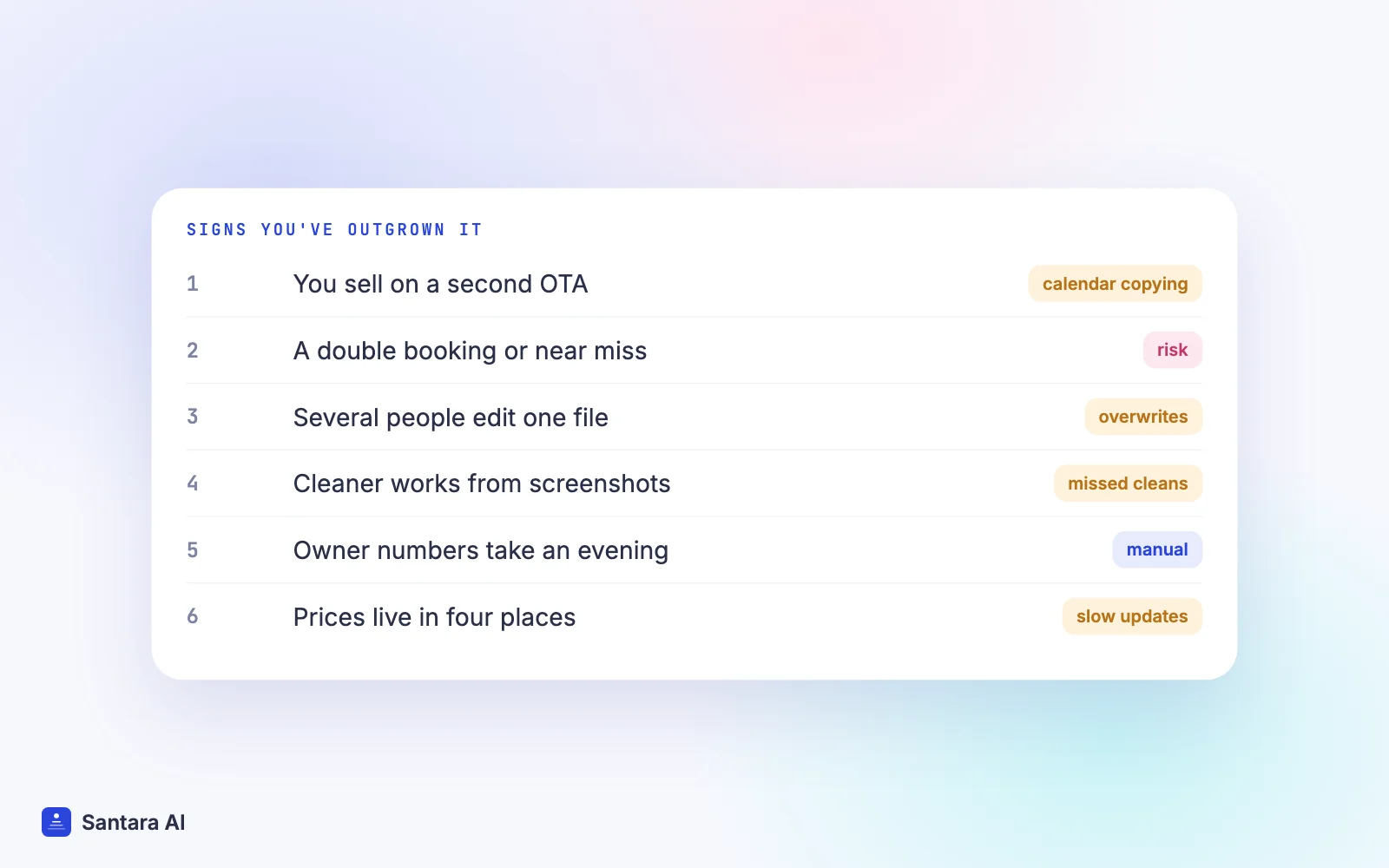
The spreadsheet does not fail all at once. It fails at specific moments. If three or more of these are true, it is time to look at software.
- You added a second OTA. Every booking now means opening the other extranets to close the same dates. If you link calendars with iCal instead, the other site only picks up changes on its own schedule; our post on iCal sync delay explains that gap.
- You've had a double booking, or a near miss. The sheet was right, but a channel wasn't updated. If it already happened, see what to do after a double booking.
- More than one person edits it. A partner, a manager and a receptionist all type into the same file, and you find rows deleted or dates overwritten.
- Your cleaner works from screenshots. You copy tomorrow's check-outs into the WhatsApp or Zalo group by hand every evening, and a late booking means a missed clean.
- Owner numbers take an evening. Each month you download payouts from every channel and rebuild gross, commission and net per property. See what a proper owner statement should show.
- Prices live in four places. A season change means editing rates in every extranet one by one.
How do you move from Excel to a PMS without losing bookings?
The order matters. Move the things that can cost you a guest first, and connect channels last, once the calendar inside the new system is correct.
Step 1
1. Export your future bookings
Pull every booking from today onward from each channel. On Airbnb (as of November 2026), the Earnings page has an "Export CSV" option, with Upcoming and Paid views you can filter by dates and listings (Airbnb Help). In the Booking.com extranet, open Reservations and filter by arrival date with the From and Until fields (Booking.com Partner Help). For Agoda and others, use the reservation list in your extranet. Keep your spreadsheet as the master list of direct bookings.
Step 2
2. List your closed nights
Owner stays, maintenance, nights you never sell. These are easy to forget because they are not bookings, and a missed one becomes an open night on every channel.
Step 3
3. Write down rates per season
Base nightly price per unit, weekend price, high-season dates and minimum stays. Taking them from your extranets now means you can compare after the move.
Step 4
4. Set up units and enter direct bookings
Create each room or villa, then enter your direct and cash bookings by hand from the spreadsheet. Check the calendar against your list, date by date, before going further.
Step 5
5. Connect the channels
Connect one channel at a time, check that its future reservations appear on the right unit, then move to the next. Our guide on switching channel manager without losing bookings covers the overlap period in detail.
Keep the old spreadsheet read-only for a month afterwards. It is your backup if something looks wrong.
What should you check in a PMS demo or trial?
Don't re-learn the vocabulary during a sales call. If you're unsure what each tool does, read PMS vs channel manager and OMS vs PMS first, and our pillar on how to choose villa management software for what you need at each size. Then test with your own data:
- Enter one real direct booking and watch the dates close on a connected channel.
- Check whether you can add a booking paid by cash or bank transfer, with a note.
- Invite your partner or manager with a limited role.
- Produce last month's numbers per unit and compare them with your spreadsheet.
- Ask what happens to your OTA listings and reservations if you disconnect.
How Santara AI handles it
Santara AI is built to replace both the spreadsheet calendar and the separate channel manager. Each room has one calendar, and Airbnb, Booking.com, Agoda and the other connected channels (63 in the catalogue) are fed from it. A booking on one channel lowers availability on the others. Rates, availability and minimum stays are set in that calendar and pushed to the channels you have mapped.
- Direct bookings by hand. Phone, walk-in and bank-transfer guests are entered on the same calendar, so their dates close on your channels too. There is no spreadsheet import, so you type them in once.
- Future bookings from channels. When you connect a channel, its future reservations are imported.
- Team roles. You can invite team members with roles to the workspace, instead of sharing one file.
- Cleaning. New bookings create cleaning tasks automatically, and the Daily Brief email lists the day's arrivals, departures and cleans.
- Owner numbers. Reports give a monthly statement per property: gross booking revenue minus channel fees minus expenses equals owner net, with a CSV download.
- Santi. When you ask, the assistant can list empty gap nights, change nightly prices for several dates at once, set minimum stays or block dates.
New accounts can message the Santara AI team from the support chat inside the app if they get stuck during setup.
What it doesn't do
Santara AI does not import your spreadsheet or a CSV of bookings, and it doesn't calculate a management fee on the owner statement. Double bookings become rare once every channel reads one calendar, but a channel can still reject an update. Santara AI records a rejected update instead of dropping it, so check those during the first weeks.
FAQ
Can I manage a homestay with just Excel or Google Sheets?
Yes, for one or two units on one booking site. Once you sell on two or more OTAs, the sheet can't close dates on those sites for you, so each booking needs manual updates elsewhere.
What columns should a homestay booking spreadsheet have?
Check-in, check-out, unit, guest, channel, gross, commission, net, cleaning and notes. Make net a formula and use dropdowns for unit and channel.
How do I export my Airbnb bookings to a spreadsheet?
Airbnb's Earnings page has an Export CSV option, with Upcoming and Paid views you can filter by dates and listings. Check the file against your reservation list.
When should a small host switch from a spreadsheet to a PMS?
When you sell on a second OTA, when several people edit the sheet, or when monthly owner numbers take hours to rebuild. Three or more of these signs is a good trigger.
Will I lose my bookings when I move to a PMS?
Not if you follow the order: export future bookings, list closed nights, record rates, enter direct bookings, then connect one channel at a time and compare.
Keep reading
- Turnover checklist and cleaning schedule template
- Airbnb vs Booking.com fees for hosts
- Best vacation rental software in Southeast Asia (2026)
Your first 3 months are free.
Join For Free